Planet Earth Available on HD-DVD & Blu-Ray DVD

In case you are looking for eye candy to demo your new 1080P flat panel television, you are in luck.

The HD-DVD & Blu-Ray DVD versions of the BBC/Discovery 11-hour high definition nature documentary are now available.

Engadget has a review here.

It’s interesting to see that content publishers are not taking advantage of the extra storage and features possible on Blu-Ray, likely to simplify their production costs across HD-DVD and Blu-Ray.  Another way this format war is likely to end up hurting the consumer.

Hawaii: The Design of the Last State Quarter is Revealed

Quick nod to the Coin Collecting News blog for this find. The design of the last of the 50 State Quarters has been revealed.  Hawaii, the 50th state to enter the United States, will get its quarter introduced toward the end of 2008.

From the Honolulu Advertiser:

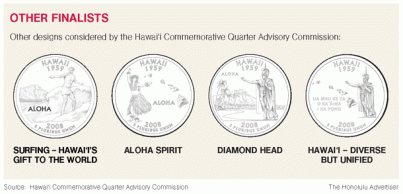
A 25-cent piece featuring the mighty profile of King Kamehameha, the eight main islands, our state motto (Ua mau ke ea o ka ‘aina e ka pono), admission year and — in case anyone doesn’t get it — the word “Hawaii” will be jingling in pockets and purses across the U.S.

Gov. Linda Lingle yesterday announced formal approval of the Hawai’i commemorative quarter, the last of 50 such quarters to be authorized and issued by the U.S. Mint. . . .

Personally, I like seeing the runner-up coin designs. It would have been cool to have a surfing quarter in production…

Life with a 320GB Raid 0 Striped Array in a MacBook Pro

I couldn’t help but provide a link to this great article by my friend Eric on his experience tricking out his MacBook Pro laptop with two 160GB hard drives, and configuring the machine as a 320GB Raid 0 Striped Array.

I’ve posted here about Eric before. He is a professional photographer, with a specialty in underwater digital photography. He also runs the website wetpixel.com professionally.

What you may not know is that Eric has a storied history with the Mac. Eric was a PC-focused freshman when he came to Stanford, but during his years on the farm he relented and ended up working on Macs. He even did an internship with the famous Apple Technology Group, in that last summer before it was killed.

Eric went back to PCs at the end of the 1990s, being extremely rational about his technical needs and the advantages at the time of the platform. But every now and again, maybe once every year or two, I’d catch Eric seriously considering going back to the Mac. Well, he finally did it a little while ago, and he’s been working off a MacBook Pro.

Eric is a pretty tough cookie to please when it comes to computers, and he demands a lot of performance out of his machines. He also really focuses on his specific needs as a photographer who travels the globe constantly.

So, I’ve been pleasantly surprised to see the pickup of Eric’s article on a lot of sites. On Lifehacker, I take some delight in seeing Eric referred to as Mac user Eric Cheng– it’s nice to see Eric publicly wed to the platform.

There has been a lot of discussion on Digg about the merits of running Raid 0 on a laptop. Personally, I wouldn’t question Eric when he gets into the zone like this on an upgrade. The stats in his article are pretty compelling, as are his experiences running Windows XP in Parallels on the upgraded machine.

My favorite comment of his, however, is directed at the Digg comments:

Some folks on the second Digg page are saying that it’s stupid to use RAID 0 in a computer, because there are “no real world benefits” and because it’s too dangerous.

I disagree. My machine is clearly running much faster, and it doesn’t seem to be running that much hotter. The fans still only spin up with high CPU usage. Battery life has always sucked on the Macbook Pro, and the estimates of losing 10-15% seems to be accurate so far. Finally, I back up frequently onto bootable, external media, even when I’m on the road, so losing my internal volume wouldn’t be catastrophic. At home, my system backs up automatically to NAS every night. The only problem is that I would have to work off of an external drive, if the RAID failed. I’d have the same problem even if I wasn’t using RAID.

I used to use a Thinkpad T-series notebook, which was a great machine because it allowed the use of two hard disks at a time in a supported, modular way. I loved that thing.

Anyway, back to the topic at hand. I’d love to hear about the negative Digg commenters’ personal experiences with running RAID 0 in a notebook. I’ll bet none of them have ever done it, and are speaking without any facts to back up their claims.

Cheers to Eric for his super cool MacBook Pro and for standing his ground.

In case you missed the link at the top, Eric’s article on adding RAID to a MacBook Pro can be found here.

How to Check the Status of Your Tax Refund

Did you file electronically this year? Waiting for your refund?

This tip from the blog GetRichSlowly:

Are you getting antsy for your tax refund? You can check the status of your refund easily with this simple web-based tool from the IRS web site. You’ll need to provide your social security number, marital status, and exact refund amount in order for your request to be processed.

If you are receiving a large refund, consider having your employer adjust your W-4 so that less is withheld from your paycheck. This will, in essence, spread your refund out over the course of a year. If you have the discipline to use this money wisely, you’ll have use of it much earlier than if you had waited for a refund.

The IRS website tool is located here.  Enjoy.

Personal Finance Education Series: (5) Diversification & Asset Allocation

It has been quite a while since I’ve posted as part of my personal finance education series, but it hasn’t been for lack of desire to do so. This is the first post that starts getting into topics on investing, and as a result, it has taken me a bit of time to collect my thoughts.

If you haven’t had a chance to review the previous two posts on Saving and Emergency Funds, please do so. It only makes sense to start talking about investing for the long term when you have the basics of good financial hygiene in place. It makes no sense to own stock in Google or money in an exchange-traded fund if you are having trouble paying off your credit card.

Of all the chapters to come in this series, however, this one is probably the most important to take to heart as you manage your own long term investments.

It turns out that the most important decision for your investments is not trying to find the next hot stock nor trying to find the savings account that pays the highest rate. It’s not finding the best new type of bond to own, and it’s not finding the lowest expense ratio. These are all important, but most likely not the biggest determinate of your investing success.

It turns out the most important decision you make with your investment dollars is how you divide your assets between different types of investments. This one decision tends to explain the majority of success and failure that people see in their investment portfolios.

Let me explain, at a high level.

It turns out that there are many different ways to invest your money. These different types of investments have different characteristics. Some people over-simplify this to whether one type of asset is “riskier” than another, but it turns out that risk comes in many flavors.

Some investments have returns that are very unpredictable in the short term. Others are extremely predictable. This is sometimes referred to as volatility.

Some investments require your money to be locked up for long periods of time. Others provide you easy access to your money. This is sometimes referred to as liquidity.

You have probably heard the names of a lot of different types of investments thrown around:

  • Cash
  • Bank Accounts
  • CDs
  • Money Market Funds
  • Bonds
  • Stocks
  • Mutual Funds
  • ETFs
  • Gold
  • Timber
  • Real Estate
  • Commodities
  • etc…

There are no shortage of different types of investments out there. Each has its own characteristics; its own strengths and weaknesses. What makes it even more confusing is that some types of investments, like mutual funds and ETFs, are really just structures that invest in other types of investments (like stocks & bonds).

The whole idea behind diversification is a reflection of that age-old advice “don’t put all of your eggs in one basket“. By spreading your money around to different types of investments intelligently, you increase the chance that when one of your investments goes down, another will be up. This smooths out the ups and downs, and makes it much more likely that you’ll hit your investment goals.

For most people who don’t have truly large sums to manage, there are only three types of assets that are applicable to most savings goals like retirement or college. They are:

  • Cash
  • Bonds
  • Stocks

Cash investments can take many forms. Some people keep their case in bank accounts or money market funds. Historically, cash investments tend to barely return any money after inflation, which means that they pay interest rates that increase roughly at the same rate that prices increase. They are the definition of liquidity, typically offering you access to your money easily and on extremely short notice.

One of the common mistakes that people make when investing for long term goals is keeping too much money in cash. Because of the low returns, over long periods of time, cash can act like a big anchor on your portfolio, limiting your ability to compound your returns over time.

Assuming you have an emergency fund of three to six months in cash, the purpose of cash in your long term portfolio is really just for three things. First, it cushions downturns in the market, since your cash portion never goes down. Second, it provides you with extra money to invest when other assets become relatively cheap. Third, it provides you with liquidity. It’s terrible for your returns to be forced to sell other assets when they are down, just because you need the money. Cash is always there for you, protecting you from yourself, making sure you don’t end up buying high and selling low.

Bonds come in many different flavors, but fundamentally all a bond is a loan. If you need to borrow a large amount a money, one way to do it is to sell bonds. For example, a company can easily “borrow” $1 Billion by selling 1 million $1000 bonds. The buyers of the bonds get a piece of paper that promises them their money back, sometime in the future, plus interest.

Bonds have been around a very long time, and as a result, there is every imaginable variety. You can find bonds from governments and companies, bonds based on mortgages or utility revenue. There are bonds that pay interest every 6 months, or only at the end of the term.

Historically, bonds have returned an average of about 1.7% above inflation, so while you will see your money grow, it won’t grow quickly. This number, of course, is a horrendous average – there are many varieties of bonds with their own histories and returns. Fundamentally, however, most people turn to bonds when they want to see higher returns than cash, and they are willing to sacrifice liquidity to get it. By locking up your money for a longer period of time, you hopefully will see higher returns.

Bonds have a lot of unique risks. There is the risk that the company will default on the bond, and never pay it back, known as default risk. There is the risk that interest rates will go up, making the bond you bought at a low rate less valuable, known as rate risk. There is the risk that inflation will grow, effectively erasing the value of your bond interest, known as inflation risk. If you want to get fancy, there is even currency risk, since your bond will tend to be denominated in only one currency.

Right now, the interest rates available on cash investments are so high relatively to bonds, that some people advocate not putting any money in bonds right now. Most financial planners, however, will tell you that keeping a set mix of stocks & bonds will smooth out your long term returns significantly, and lower the risk that you’ll end up missing your investment goals. Historically, there have been long periods of time where bonds outperformed stocks, and having money in bonds can ensure that when stocks are underperforming, your portfolio will survive to fight another day. Ben Stein captures this really well in his recent book, which I reviewed here.

Personally, I tend to group cash & bonds together in my asset allocation, since I find it useful to think of cash as just another type of bond that happens to have very high liquidity, and relatively lower returns. Sometimes, however, cash can be the best place for the “fixed income” portion of your portfolio at times. Right now, it’s hard not to like the 5.05% you can get at E*Trade or EmigrantDirect on a bank account with no minimums and liquidity.

Stocks are the most common basic investment in modern personal finance for achieving long term investment goals. Historically, they have returned approximately 6% over inflation, meaning that they are one of the few asset classes to aggressively grow your spending power over time. Stocks are really just pieces of paper that give you part ownership in a business. When a company like eBay has 1.7 Billion shares, each share is like owning a little piece of the overall business.

Stocks are incredibly liquid, and are now freely traded world-wide. Stocks are also incredibly volatile, with prices moving up and down every minute, every day. Because of this, stocks have a reputation for being risky. If you have all of your first house down payment in stocks, it is possible for that account to drop more than 20% in a single day, and that’s bad news if that’s the day before closing.

In the long term, a diversified portfolio of US stocks has been an incredibly rewarding investment. As a result, people have a hard time balancing the short term risk of stocks with the long term risk of not owning stocks.

For most people, even those in retirement, a significant portion of your portfolio likely belongs in stocks. However, it is extremely important to balance that investment with other assets, and to be realistic about how much volatility your investment goals will allow for.  Most Americans have too much of their long term savings in cash, and too little in stocks.

There are over 9000 public stocks in the US alone, and there are many different kinds of stocks.  There are giant companies like General Electric & Microsoft, and tiny companies you have never heard of. As a result, having a diversified portfolio of stocks is likely the most important aspect of this asset class.  I’ll post a whole separate chapter on this topic.

This has been an extremely long chapter, and we haven’t even scratched the surface on some of these topics.  There is one last topic I want to illustrate, and that is the benefit of rebalancing your portfolio based on an asset allocation strategy.

Let’s take a hypothetical portfolio of $10,000 broken down as:

  • 10% Cash:  $1000
  • 30% Bonds:  $3000
  • 60% Stocks:  $6000

Let’s assume that the Bonds and Stocks are represented by broad, cheap index funds from Vanguard.

Let’s say that Year 1 is really bad for stocks, and mediocre for bonds and cash.  Stocks return minus 10%, and bonds return 4%, and cash returns 5%.  Your portfolio becomes:

  • $1050 Cash
  • $3120 Bonds
  • $5400 Stocks

No question, it’s bad news.   Your portfolio is now worth only $9570.  However, if you had been 100% in Stocks, you’d be down to $9000.   The Bonds & Cash cushion the blow of a bad year on the market.

Since your goal is a 10%, 30%, 60% split, you want to rebalance your portfolio once a year.  This means moving your money around so that you now have:

  • $957 in Cash (10%)
  • $2871 in Bonds (30%)
  • $5742 in Stocks (60%)

Basically, you move money from the assets that did well this year, into the assets that did poorly.  This may seem counter-intuitive to those who believe in going with their winners and selling their losers, but this single act encapsulates one of the most practical benefits of a good asset allocation strategy:  it forces you to sell assets that are high, and buy assets when they are low.  Assets tend to regress to their average performance, so this rebalancing has been proven to be a winning strategy to avoid the very human mistake of buying investments when they are high, and selling them when they are low.

Let’s look at what happens in Year 2, assuming that an “average” year happens.  Cash returns 3%, Bonds return 5.5%, and Stocks return 10%.

  • $986 Cash
  • $3029 Bonds
  • $6316 Stocks

As you can see, by moving money into Stocks after the down year, the portfolio is set up for better performance when stocks do, inevitably, recover.  This wouldn’t be possible, however, without having money in different asset classes.  It also assumes extremely good diligence and fortitude to rebalance every year.

Whew!  Long chapter.  A lot of great topics.  For those of you waiting for more detail on each asset class, I plan on having the next few chapters focus on individual asset classes and investment goals.

AppleTV Upgrade Kits from WeaKnees: 160GB for $249

So, in case you missed my earlier post, I got an AppleTV last month and it is just awesome. For a 1.0 product, phenomenal. I think Apple is really onto something here, but that’s a topic for another post.

One of the biggest criticisms of the AppleTV has been the relatively small 40GB hard drive. The AppleTV can stream video content from your computer, so it doesn’t actually need to download everything. But, it can’t stream photos or music (yet), and so if you have a big media library, you can get into an issue where you are micromanaging which content will appear on the AppleTV and which won’t.

I’ve used the AppleTV to be a personal, video-on-demand solution for my son, who at 2 1/2 man-handles DVDs to the point of destruction. I’ve ripped most of his movies to iTunes using MacTheRipper and HandBrake, so he has his own video library easily accessible

My son Jacob (who is 2 1/2 years old), loves the AppleTV. In fact, it’s one of the few phrases he’ll reliably hit on in the morning.

However, each movie takes up about 1-2GB, so we’re already maxing out the storage. There are instructions online on how to swap out the drive, but WeaKnees goes one better.

For a fairly small premium, WeaKnees will swap out the drive for you, and hand you back a 160GB AppleTV. Or, if you haven’t bought one yet, you can buy one new from them for $549.

I became a WeaKnees fan in 2002, when I realized that while I could upgrade Tivo drives myself, it wasn’t worth the time & effort. Just buy the drive pre-formatted from WeaKnees, and do the rest yourself.

Definitely worth checking out.

Blogging from the British Airways Lounge at SFO

Surprisingly, I find myself stuck in the airport with at least 90 minutes to kill.  I’m leaving today for London, to help participate in some of the global reviews happening this week for eBay, and my itinerary ended up being somewhat compressed.

Leaving:
4:50 PM on Tuesday, April 24th from San Francisco.  Arrive at 11:00 AM on Wednesday, April 25th in London.

Returning:
10:50 AM on Thursday, April 26th from London.  Arrive at 1:40 PM on  Thursday, April 26th in San Francisco.

BAM!  That’s a quick trip.

In the meantime, this is my first time flying British Airways, so I’m trying to absorb as much as I can.  The lounge seems pleasant, kind of like a hotel lobby with lounge chairs facing the tarmac and  a stocked snack bar with soft drinks & cookies.

No wireless access in the lounge, but direct connect at these little cubbies.  So, instead of lounging and reading, I am blogging and surfing.

To each their own.

Mike Schroepfer, 40th Most Important Person on the Web

Congratulations to Mike! Here is the glowing snippet from PC World:

40. Mike Schroepfer
Vice president of engineering, MozillaIn the ongoing browser war, Mike Schroepfer is a five-star general who leads a massive but decentralized open-source army of staff and volunteer engineers. Its mission: to improve what is right now the best Web browser on the planet, Firefox. The open-source nature of Firefox permits a faster development cycle for incorporating new features and security fixes. The proof of its success is Internet Explorer 7’s adoption of FireFox features such as tabbed browsing. See our recent comparative review, “Radically New IE 7 or Updated Mozilla Firefox 2–Which Browser Is Better?

When you are friends with someone for a long time, these type of honors put a lot of memories in context. For example, instead of saying “In 1995 I spent spring break in Florida with Mike”, I can now say, “In 1995 I spent spring break in Florida with the 40th most important person on the web.”

Very cool. Congratulations!

Top Ten VC Lies

Too good to pass up… from Paul Kedrosky’s blog tonight.

The Top 10 VC Lies…

10. We’re all on the same side here.
9. A lower Series A valuation is good for you too.
8. We’re not funding XXXX companies anymore.
7. I liked it. Really. But we just don’t have the bandwidth right now.
6. We don’t do deals we can’t drive to.
5. Come back when you have a lead investor.
4. Absolutely, we know top people at Google and Yahoo well.
3. Absolutely, we know people at Sequoia and KP well.
2. We love your CEO.
1. I liked it, but I couldn’t get it past my asshole partners.

Enjoy.

Google Reader, Meet the Mac OS X Look & Feel

Now this one is a lot of fun…

I moved my blog reading from My Yahoo to Google Reader about 6 weeks ago.  It has been tough to adjust to the new habit – my instinct is to always go to My Yahoo.  But My Yahoo just wasn’t scaling for the number of blogs I like to keep tabs on (now over 100),  and I noticed that a majority of the people reading my blog were now using Google.

Thankfully, Firefox has made this easier.  The ability to quickly change the behavior of “adding a feed” to Google from My Yahoo made the transition simple for new feeds.

For exporting my old feeds from My Yahoo to Google, I found a nifty tip online on how to export an OPML file from My Yahoo and import into Google Reader.  Just spent a few minutes categorizing all my feeds, and I was ready to go.

Well, today I discovered a new trick.

This post shows you how to skin Google Reader using CSS to look like Mac OS X.  It’s really neat, although it’s a little weird that the author’s name is Adam Pash.

On Firefox, you basically want to go here and download Stylish.  Stylish is an add-on that lets you customize the CSS for any website.

Then, go here to download the Mac OS X theme for Google Reader.

Once you unzip, open the CSS in a text editor, and copy & paste it into Stylish.  On Mac OS X, I had to do this manually by opening the Add-Ons dialog, and open the Stylish preferences, but I got it to work.

It’s pretty neat, and I like the new look & feel of Google Reader.  It’s also pretty neat to see CSS as a form of “lightweight plug-in” for websites.  I’ve got to show this to some of the front-end folks on eBay Express – we use CSS heavily, and I bet you could come up with some pretty neat skins for the site using Stylish.

US Coin Melting Ban Tightens… Check Your Baggage for Change.

The Coin Collector’s Blog reports today the US Mint has finalized the melting ban on US coins, particularly pennies and nickels where the copper and zinc content now exceeds the value of the coins.  They clearly want to avoid entrepreneurs buying pennies by the ton, shipping them offshore, and melting them down.

I posted about this phenomenon last yet… the value of Zinc and Copper have skyrocketed.  The penny, despite its color, is mostly Zinc these days.  Nickels, despite the name, are mostly Copper.  Who knew?

The press release from the US Mint is here.

Here is some detail you may not have caught.  Besides melting, it is now illegal to take a large amount of coins out of the country.  What is a large amount?  Try $5 worth.

That’s right.  Check your suitcase.  If you have more than $5 in small coins, you might be set up for a $10,000 fine per violation, or up to five years in federal prison, or both.  Ouch.

Fortunately, you are only liable if you knowingly violate the regulation.

Reminder: April 17, 2007 is Your Last Chance to Fund a 2006 IRA

This is just a reminder that tomorrow, Tuesday, April 17th, 2007, is your last chance to fund an IRA for the 2006 tax year. After tomorrow, you will have lost the chance forever to make your contribution for 2006.

You can contribute up to $4000 in 2006 towards an IRA if you are under 50. If you are 50 or over, you can actually contribute $5000 in 2006.

Many people don’t realize that even if you have a 401(k) or 403(b) plan at work, you can still qualify to contribute to an IRA.

Assuming that you are not opening an IRA for your partnership or business, there are four IRAs to be aware of:

  • Deductible IRA. This is what most people think of when they think of an IRA. This is a retirement account where you get to deduct your contributions for the year off your income on your tax return. The problem? You can’t deposit into this type of IRA if you have a 401(k) or 403(b) plan at work, and people over a certain income are disqualified.
  • Roth IRA. The hero of the hour. This is the IRA that everyone is talking about. You don’t get a tax deduction this year, but you get a better bonus down the road. All gains on this IRA are tax-free, forever, as long as you withdraw them after the age of 59 1/2. Problem? You can’t contribute to this IRA if you make more than $110,000 as an individual, $160,000 as a married couple filing jointly.
  • Rollover IRA. You can’t contribute to this type, but this is a great place to move your 401(k) money from your old company. It keeps the tax status of the old 401(k), and it usually gives you access to a much wider variety of investment options. Better yet, you have the option of either converting this IRA to a Roth IRA, if your income permits, or you can roll it into a future company 401(k) if you’d like.
  • Non-Deductible IRA. This is the over-looked gem of the IRAs. Anyone can contribute to these in any year, regardless of income. You will owe taxes on the gains when you withdraw them in retirement, but they get to compound tax free until then.

There are several good reasons to consider an IRA contribution this year, even if it’s non-deductible:

  • You never get the chance to go back and make contributions for past years. You lose your option to make a 2006 contribution tomorrow, forever.
  • You can now make IRA contributions for a spouse that does not work, up to $4000 for a year.  A great addition if you are in a one-income household, and you are concerned that your retirement savings are limited.
  • In 2010, thanks to the 2006 budget, you will get the ability to convert a non-deductible IRA to a Roth IRA, regardless of income! Check out my post on the 2010 Roth IRA Conversion Loophole for more information.

Reasons not to make an IRA contribution for 2006:

  • You can’t afford the drop in liquidity of having your money locked up for potentially decades.
  • You forgot about the April 17th deadline, and read this post too late.  🙂

Opening up a new IRA is extremely low cost, if not free. E*Trade offers free IRAs. Vanguard offers IRAs for only $10. You can open them online, with a transfer direct from your checking account.

Happy Saving!

Mom My Ride & Minivans on eBay Motors 2.0

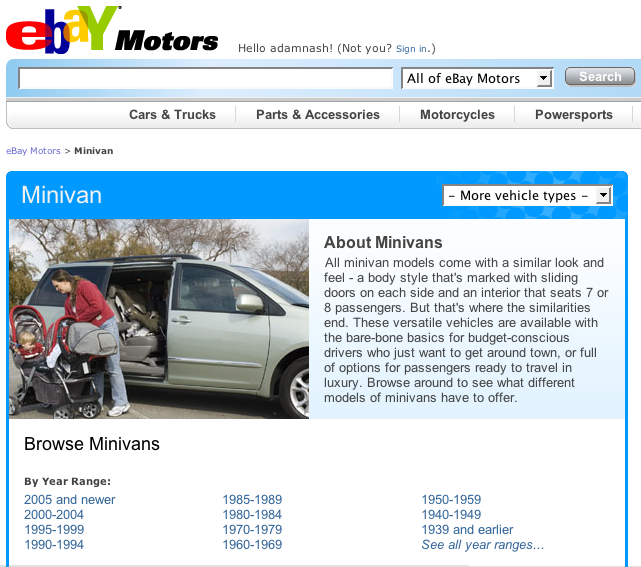
eBay has been testing their new eBay Motors site in the past few weeks.  However, what many people might not have noticed is that Carolyn & the boys are the picture-perfect representatives of the new Minivan page:

Now, since I’ve taken a lot of flack in some circles about actually owning a minivan, Carolyn forwarded me this great spoof video on Youtube called “Mom My Ride”.

I’m posting it here as just a little bit of love for my friends at eBay Motors.

Enjoy.

Amazon S3: Backbone to Cheap Multi-GB Web Backup for Mac OS X?

About a year ago, Amazon launched it’s S3 storage service.  This seemed a little strange to me at the time, because Amazon’s core business is as an online retailer… it was unclear to me what type of strategic advantage they would have as a long term of provider of cheap, online storage.

“Let a thousand flowers bloom,” I guess… (one of the most misunderstood quotations used around innovation, by the way.  Check out the source!)

In any case, I received my regular TidBITS digest email today, and it featured web-backup services for the Mac.  What was interesting was that the article featured primarily applications that use Amazon S3 as their backbone!  At $0.15 per GB, and $0.20 per GB/transfer, Amazon is a fairly cheap way to backup & store large libraries, like music & photos.

Several small software shops have built applications to help users do just that…

Here is the original TidBITS article.  The applications covered include:

  • Jungle Disk.   This application is the most polished of the bunch.  It does not handle incremental backups, yet, but it does support scheduled backups.  It will cost $20 when it reaches 1.0, but it’s free right now in beta.  Jungle Disk is available for Mac OS X, Windows & Linux.
  • S3 Backup.  This application, by Maluke, offers different named backups, as well as the ability to exclude files based on pattern matching.  However, it doesn’t offer scheduling or incremental backups, yet.  Still in beta.
  • Bandwagon.  This application is tailored for music lovers who want to backup and maintain a large music library online, to be available to multiple machines or for safe keeping.  Very interesting because it offers menu-bar controls, and support for multiple “storage clouds”, including Amazon S3.

I remember a few years ago looking into online backup solutions, and being totally disillusioned with the low storage volumes and costs offered.  I have about 300GB of content to backup, with daily increments that vary from 10MB all the way up to 2-3GB on days I upload a new set of photos from my camera.

These solutions aren’t there yet, but they are closer.  And the pricing is closer too.

Anyone out there actually try one of these?  Or are you using Amazon S3 for anything else interesting?