Pinterest & LinkedIn: Identity of Taste vs. Expertise

It’s hard to go three feet in Silicon Valley these days without someone commenting on the phenomenal engagement and growth being seen from Pinterest and other curation-based social platforms.  What’s a bit surprising to me, however, is how many people refer to this demand as a growing interest and search for “expertise”.

As I have a passion for finding a more human understanding for what drives engagement in real life and then mapping it to online behavior, I think the use of the term “expertise” here is misleading.  Instead, I believe what we are seeing is an explosion of activity around an incredibly powerful form of identity and reputation: the identity of taste.

Expertise is Empirical

If you go to LinkedIn, you see a site that is rich with the identity of expertise.  LinkedIn has rich structured data around sources of expertise: degrees, schools, companies, titles, patents, published content, skills.  They also have rich sources of unstructured content about job responsibilities, specialties, questions & answers, group participation, status updates and comments.  There are even implicit indications of expertise related to other online identities (like Twitter) and relationships to other people with expertise (connections).

This expertise can be tapped by using LinkedIn’s incredibly powerful search engine, either on site or via API, or by browsing the talent graph displayed in catalog form on LinkedIn Skills.  Github has created a powerful identity for developers based on their actual interests and contributions in code.  Blogs, Tumblr, Quora and Twitter have helped people create identities based on the content they create and share.

The power of identity based on expertise is that it is concretely demonstrated.  Education, experience, content and relationships are all very structured and concrete methods for measuring and assessing expertise.  However, in some ways, expertise is limited by it’s literal nature.  Factual. Demonstrable. Empirical.

Taste is Inspiring

Pinterest, however, has unlocked an incredibly powerful form of reputation and identity that exists in the offline world – an identity of taste.  People don’t care about the expertise of people who are assembling pinboards.  They care about how those combinations make them feel – the concept, the aggregation, the flow of additions.  The Pinboard graph begins for most people with their friends, but people quickly learn to hop based on sources to people they don’t know, finding beautiful, interesting, intriguing or inspiring collections of images.

This isn’t an identity based on expertise, really.  It’s not even clear how closely related it is to a graph of interests. Curation-based social platforms evoke a different phenomenon, and with it, some very powerful emotions and social behaviors.

Taste is different than expertise.  Taste does not imply that you are a good person or a deep well of expertise on the domain.  Taste is not universal, although there are certainly those with a predilection for influencing and/or predicting the changes in taste for many.  But when we as human beings find people whose taste inspires us, it’s a powerful relationship.  We map positive attributes to them, ranging from kindness to intelligence to even authority.  Fame & taste are often intertwined.

You Are What You Curate

Curation-based social platforms are based on the interaction of three key factors:

  1. A rich, visual identity and reputation based on curated content
  2. An asymmetric graph based on not only following people, but specific feeds of curated content
  3. A rich, visual activity stream of curation activity

It’s the first item that I seem to see most under-appreciated.  Vanity, as one of the most common deadly sins in social software, drives an incredible amount of engagement and activity.  As people are inspired by those who create beautiful identities of curated content, they also become keenly aware of how their curated identity looks.  When people signal an appreciation for their taste, it triggers power social impulses, likely built up at an early age.

This, more than anything else, reflects the major step function in engagement of this generation of curation over previous attempts (anyone remember Amazon Lists?)

How Does Taste Factor into Your Experience?

I always like to translate these insights into actionable questions for product designers.  In this case, these are some good starting points:

  • How does taste factor into your experience?
  • Is the identity in your product better served by reputation based on taste or expertise?
  • Are the relationships in your product between users based on taste or expertise?
  • Are you creating an identity visually and emotionally powerful enough to trigger curation activity?
  • Are you flowing curation activity through your experience in a way that stimulates discovery and the creation of an identity of taste?

Don’t underestimate the power of good taste.

Be a Great Product Leader

People who know me professionally know that I’m passionate about Product Management.  I truly believe that, done properly, a strong product leader acts as a force multiplier that can help a cross-functional team of great technologies and designers do their best work.

Unfortunately, the job description of a product manager tends to either be overly vague (you are responsible for the product) or overly specific (you write product specifications).  Neither, as it turns out, is it effective in helping people become great product managers.

I’ve spent a lot of time trying to figure out a way to communicate the value of a product manager in a way that both transparently tells cross-functional partners what they should expect (or demand) from their product leaders, and also communicates to new product managers what the actual expectations of their job are.  Over the years, I reduced that communication to just three sets of responsibilities: Strategy, Prioritization & Execution.

Responsibility #1: Product Strategy

They teach entire courses on strategy at top tier business schools.  I doubt, however, that you’ll hear Product Strategy discussed in this way in any of them.

Quite simply, it’s the product manager’s job to articulate two simple things:

  • What game are we playing?
  • How do we keep score?

Do these two things right, and all of a sudden a collection of brilliant individual contributors with talents in engineering, operations, quality, design and marketing will start running in the same direction.  Without it, no amount of prioritization or execution management will save you.  Building great software requires a variety of talents, and key innovative ideas can come from anywhere.  Clearly describing the game your playing and the metrics you use to judge success allows the team, independent of the product manager, to sort through different ideas and decide which ones are worth acting on.

Clearly defining what game you are playing includes your vision for the product, the value you provide your customer, and your differentiated advantage over competitors.  More importantly, however, is that it clearly articulates the way that your team is going to win in the market.  Assuming you pick your metrics appropriately, everyone on the team should have a clear idea of what winning means.

You should be able to ask any product manager who has been on the job for two weeks these questions, and get not just a crisp, but a compelling answer to these two questions.

The result: aligned effort, better motivation, innovative ideas, and products that move the needle.

Responsibility #2: Prioritization

Once the team knows what game they are playing and how to keep score, it tends to make prioritization much easier.  This is the second set of responsibilities for a product manager – ensuring that their initial work on their strategy and metrics is carried through to the phasing of projects / features to work on.

At any company with great talent, there will be a surplus of good ideas.  This actually doesn’t get better with scale, because as you add more people to a company they tend to bring even more ideas about what is and isn’t possible.  As a result, brutal prioritization is a fact of life.

The question isn’t what is the best list of ideas you can come up with for the business – the question is what are the next three things the team is going to execute on and nail.

Phasing is a crucial part of any entrepreneurial endeavor – most products and companies fail not for lack of great ideas, but based on mistaking which ones are critical to execute on first, and which can wait until later.

Personally, I don’t believe linear prioritization is effective in the long term.  I’ve written a separate post on product prioritization called The Three Buckets that explains the process that I advocate.

You should be able to ask any product manager who has been on the job for two weeks for a prioritized list of the projects their team is working on, with a clear rationale for prioritization that the entire team understands and supports.

Responsibility #3: Execution

Product managers, in practice, actually do hundreds of different things.

In the end, product managers ship, and that means that product managers cover whatever gaps in the process that need to be covered.  Sometimes they author content.  Sometimes they cover holes in design.  Sometimes they are QA.  Sometimes they do PR.  Anything that needs to be done to make the product successful they do, within the limits of human capability.

However, there are parts of execution that are massively important to the team, and without them, execution becomes extremely inefficient:

  • Product specification – the necessary level of detail to ensure clarity about what the team is building.
  • Edge case decisions – very often, unexpected and complicated edge cases come up.  Typically, the product manager is on the line to quickly triage those decisions for potentially ramifications to other parts of the product.
  • Project management – there are always expectations for time / benefit trade-offs with any feature.  A lot of these calls end up being forced during a production cycle, and the product manager has to be a couple steps ahead of potential issues to ensure that the final product strikes the right balance of time to market and success in the market.
  • Analytics – in the end, the team largely depends on the product manager to have run the numbers, and have the detail on what pieces of the feature are critical to hitting the goals for the feature.  They also expect the product manager to have a deep understanding of the performance of existing features (and competitor features), if any.

Make Things Happen

In the end, great product managers make things happen.  Reliably, and without fail, you can always tell when you’ve added a great product manager to a team versus a mediocre one, because very quickly things start happening.  Bug fixes and feature fixes start shipping.  Crisp analysis of the data appears.  Projects are re-prioritized.  And within short order, the key numbers start moving up and to the right.

Be a great product leader.

This work is licensed under a Creative Commons Attribution 3.0 Unported License.

Zynga, Equity & Tough Decisions

A couple of days ago, a story broke in the Wall Street Journal about Zynga “leaning” on some early employees to surrender portions of their equity.  Not surprisingly, this blew up a bit in the press, leading to a wide number of articles talking about the potential threats to the Silicon Valley equity culture, employment litigation, and a number of fairly serious issues.

As Zynga has indicated that their IPO is imminent, no doubt a lot of this is fueled by the fact that Zynga is a hot company right now.  But some of the issues raised are very real, and I thought it might be interesting to lend a different perspective to the story as a opportunity to think more deeply about the challenges leaders face in hyper growth companies, even ones as successful as Zynga.

Executives are expensive

Marc Andreesen wrote a great blog post on some of the very real issues around hiring, managing and firing executives in hypergrowth technology start-ups.  It’s too long to capture everything here, but I do recommend reading it. Marc calls it the “executive firing paradox”:

It takes time to gather data to evaluate an executive’s performance. You can’t evaluate an executive based on her own output, like a normal employee — you have to evaluate her based on the output of her organization. It takes time for her to build and manage her organization to generate output. Therefore, it takes longer to evaluate the performance of an executive than a normal employee.

But, an executive can cause far more damage than a normal employee. A normal employee doesn’t work out, fine, replace him. An executive doesn’t work out, it can — worst case — permanently cripple her function and sometimes the entire company.Therefore, it is far more important to fire a bad executive as fast as possible, versus a normal employee.

Now, the facts of the Zynga story are a bit blurry in the press, but for the purposes of this blog post, I’m assuming the following:

  • This issue affected a relatively small number of people at Zynga, specifically executive-level hires
  • These people were identified, over time, as underperformers at the original role they filled
  • These people still had not vested their equity

Obviously, the above distinctions above matter greatly in terms of the tricky balance of issues around making a decision like this.

It’s worth noting, however, that executives are expensive hires.  If an executive is vesting 250K shares per year, and hiring a new engineer or designer costs 10K shares per year, then that person really has to deliver an incredible amount of value to justify their compensation.  After all, you could use the money to hire 25 additional engineers.  A great leader can easily justify that value (and more) in terms of their power to create long term value for the company, but it’s definitely a high bar to clear.

The Reason for Vesting

Not to be pedantic, but there is a very good reason why employees at tech companies are given equity.  Fundamentally, the best corporate cultures in Silicon Valley are based on people working together not to just build technology or products, but actively working to build a great company.  Stock ownership is an important part of that culture – when people have meaningful equity in a company, it cements the idea that everyone is a part-owner of the business.

Four years may not seem like a long time, but in truth, hypergrowth tech companies grow and change at rates that seem theoretically impossible.  Zynga had 150 employees in 2008.  LinkedIn had fewer than 400.  As a result, the responsibilities and requirements of almost any position at the company radically change in a year, let alone four years.  This is one of the great opportunities that high tech companies afford employees who take advantage of growth to stretch and grow quickly into new responsibilities and experiences.  But it’s extremely challenging, and fairly unforgiving as hypergrowth means that every person’s efforts potentially impact dozens of employees going forward and millions of users.

Vesting exists as an important reminder, however, that your share of the company is earned over time, not at signing.  You earn your share of the company – every day, every month, every year.  For most people, this isn’t an issue, because it is amazing how dedicated people are in Silicon Valley.  People are passionate about what they do and the teams they work with, and that passion translates into world-class dedication and effort.

Real Equity, Real Money, Really Tough Decisions

Back to Zynga.  Let’s assume, for a second, that you have the situation described in the Wall Street Journal.  You’ve identified a small number of relatively high level employees who, for whatever reason, you decide are underperforming their original roles.  Normally, there are a couple of options:

  1. Tolerate the under-performance, or compensate for it with additional hires, but let them “vest out” their stock grants despite the fact that they aren’t filling the role that the equity was predicated on.
  2. Fire them.

As per Marc Andreesen’s post, option (1) is toxic.  The equity, while material, isn’t the dominant issue.  The impact to the company culture can be devastating, and if a repeated pattern, permanently damaging to the ability of the company to attract and retain the best talent and have them do their best work.

Let’s not forget also that we ask our company leaders to be thoughtful of their responsibilities to shareholders as well, particularly in public companies.  Executives are expensive hires, and equity allocated to them could always be allocated to hiring other great people.  Human beings tend to suffer from “sunk cost fallacy”, and they hate to admit mistakes and take on difficult confrontation.  Option (1) swims in all of those issues.

But option (2) doesn’t always feel right in a hyper-growth company either.  What if the employee has a number of positive attributes and skills?  What if you would gladly hire them today, just in a different role?

From the press, it looks like Zynga tried to find a third way.  Rather than fire the employee, offer them the ability to stay at the company in a role that better suits their performance, with compensation to match.

You may not agree with that approach, and I think Semil Shah does a good job in TechCrunch talking about the cultural issues that this type of approach can cause.  But it would be foolish not to see that this is really a tough decision, and shouldn’t be trivialized or sensationalized.

Talking vs. Doing

There has never been a shortage of armchair quarterbacks and theorists debating the merits and demerits of different leadership actions and company cultures.  It’s part of an ecosystem that rewards thinking and learning.

It’s relatively simple to have a knee-jerk, emotional reaction to a piece like the one in the Wall Street Journal.  Let’s face it, that’s part of the reason they published it.  Companies like Zynga are amazing, and more importantly, they matter.  How they grow, navigate, succeed and fail is part of how we all learn to build better high tech companies.

It’s fairly easy, in fact, to demonize actions that you don’t agree with.  However, it’s often a much more productive intellectual path to ask yourself, “Why would good, smart, ethical people do this?”  Whether you agree or disagree with the actions taken by Zynga here, these are very hard decisions, and there is a lot for aspiring technology leaders to think about and learn from.

As Tom Hanks said in “A League of Their Own”:

If it wasn’t hard everyone would do it. The hard is what makes it great.

The Synology DS1511+ RAID NAS & Time Machine on Mac OS X Lion

I recently suffered one of those storage network failures that you have nightmares about.  After spending more than $1000 on a NetGear ReadyNAS NV+, I had a catastrophic failure that cost me all of the data on the system.  Believe it or not, it was a single drive failure – exactly the type of problem you spend money on a RAID system to survive.  Unfortunately, in my case, it didn’t.

On the bright side, I had the opportunity to rethink and rebuilt my storage and backup solutions from scratch.  In a recent blog post, I described my new network and storage topology.

Synology DS1511+ to the Rescue

The Synology DS1511+ is a great device.  It sits on your Gigabit network, handles up to five SATA hard drives, and can act as a wide variety of servers for your network.  I configured my with five 3TB Western Digital Caviar Green drives, for 15TB of notional storage, 8.3TB of usable storage.

The Synology supports “dual drive redundancy”, so for the price of 2 drives worth of storage, you end up with protection for your data even if two drives fail simultaneously.  Needless to say, I went for that option.

The industrial design of the box is well done.  You do have to break out the screwdriver to install the drives into trays (not quite as nice as the Drobo FS plug-and-play SATA drives), but the case itself is small, quiet and black.  It also has nice locks on each drive bay, which has made it “child proof” for my 2 year old who is unfortunately fascinated with the blinking lights.

The Synology box is incredibly fast.  First, it supports two Gigabit Ethernet ports, to establish connections from multiple clients independently.  But even from one machine, it’s wicked fast.  Simple Finder copy of a 500MB file to the drive takes under 6 seconds.  I was able to back up 2.7M files totally 4.05TB in size using Time Machine (usually dog slow) in about 26 hours.

The Synology management software is Windows 2000 like in terms of its user interface and incredible breadth of options.  Needless to say, I only use about 1% of them.  I did run into one issue, and hence the title of this blog post.  Configuring the box for Time Machine on Mac OS X 10.7 Lion was non-trivial.

Time Machine on Mac OS X 10.7 Lion & Synology DSM 3.2

Time Machine, unfortunately, is the most consumer friendly solution for incremental backup on the Mac.  Unfortunately, if you have multiple machines, you run into a small issue: Apple designed the software as if it “owns” the entire drive you point it at.  As a result, you can’t just point all your machines at a single network drive without a number of bad things happening.

Instead, you have to somehow convince Time Machine to only use part of the drive.  This turned out to be quite an issue for me, since I wanted to be able to backup my machine (~4TB) as well as my wife’s MacBook Pro (~500GB).

Synology has published documents on how to configure the box for Time Machine, and has designed it’s software around a very clever option.  The basic idea is that you create a different “user” for each machine you want to back up with Time Machine.  For each user, you assign a limited quota, and then you tell Time Machine to use that user for the Synology volume.  It actually works quite well, although it feels a little strange to create separate user accounts for each machine, on top of accounts for each user.

The Undocumented 4TB Limit

Unfortunately, I ran into an undocumented issue.  When I tried to set the quota for my machine to 6000 GB (in general, you want to give 50% extra room for incremental changes / backups), Time Machine would only see about 1.8 TB.  When I checked the DSM 3.2 interface, I found indeed that it had reset 6000 GB to 1804 GB.  After trying to set it several times with the same issue, I deduced that the maximum limit was 4096 GB, and that it was “wrapping” around that number.  Sure enough, entering 4100 -> 4, and entering 4096 actually turned to 0, shutting off the quota entirely!

After some back and forth with Synology customer service, they finally admitted this was true.  (The first two times, they claimed that the issue was with Mac OS X 10.7 Time Machine not respecting quotas.)  I hope they fix the software to at least tell the user when they type a number over 4095 that they’ve exceeded the limit.

The Solution: Disk Groups, Volumes & Shares

To solve the problem, I reverted to a more old-fashioned solution: partitions.  Of course, with a sophisticated, modern RAID box, this was a bit more complex.  The Synology DSM 3.2 software supports three relevant concepts:

  • Disk Groups:  You can take any number of the drives and “bind” them together as a disk group.
  • Volumes:  You can allocate an independent “volume” of any size over a disk group.
  • Shares:  You can specify a share on a given volume which is available to only certain users.

The key here is that normally you use quotas to limit storage on shares for specific users.  But since I was looking for a “6 TB” share, there was no way to do this.  By default, shares get access to the entire volume they are on, so the key was to repartition the box into separate volumes.

As a result, I configured my box as follows:

  • One disk group across all 5 disks, configured for dual drive redundancy using Synology Hybrid Raid (SHR)
  • Three volumes: one for my iMac’s time machine (6000 GB), one for my wife’s Macbook Pro (1000 GB), and one remainder for network storage (1.3 TB)
  • For each volume, I configured a single share, without quota limits.  I gave my account access to my backup share, my wife her backup share, and gave everyone access to the general media share

Works like a charm.  My iMac sees the 6TB volume for Time Machine, mounts it as needed, and backs up every hour.  Thanks to the incredible Synology speed, most incremental backups happen in the background in seconds without any noticeable performance lag.  In fact, the original backup of 4.05TB with Time Machine took about 26 hours.  On my NetGear ReadyNAS NV+, that same initial backup took almost a week.

Recommendation: Synology DS1511+

I have to just say that, despite some back and forth over the Time Machine issue, the Synology website, wiki and documentation are all well done.  They are clearly responsive, even responding to my issues over Twitter.  Given the industrial design, features, and performance of the box, I have no trouble recommending the DS1511+ to anyone who’s looking for a large (10TB+) network attached storage solution for backup of a mixed network.

Disclosure: Synology was kind enough to provide me the DS1511+ free of charge given my difficult situation.

How to Extract Short Films from iTunes Extras

This is a quick tip, but somewhat delightful, so I’m sharing it here on this blog.  Credit to DJ Patil for goading me to write this up.

iTunes Extras

Recently, Apple debuted a new feature at the iTunes Store.  When you buy certain movies, typically the more expensive HD versions, you also get the “iTunes Extras”.  The iTunes Extras are basically “everything else” that comes packaged on Blu-Ray and DVD discs: deleted scenes, trailers, exposés on the making of the film, and for certain films (like Pixar movies), short films.

Free the Short Films!

There is a small problem with this system, however.  When you sync your iPod, iPhone or iPad with the library, you don’t get the iTunes Extras.  When you connect with the AppleTV, you don’t see the iTunes Extras.

More importantly, you don’t really want to carry around gigabytes of the extras.  I just don’t need to see “Making Of” clips that often.

Fortunately, it turns out to be an easy problem to solve.

Open the Package

Cracking open the iTunes Extras turns out to be trivial.  In fact, it’s not even cracking – it’s like finding the little red string on a wheel of cheese that makes it trivial to remove the wax covering.  Here are the steps:

  1. Go to the iTunes Extras file in iTunes, and “right click” or “control-click” the file.
  2. Select “Show in Finder” from the menu
  3. You will now see the folder for the movie in your iTunes Library.  There will be a file selected with an “ITE” extension.
  4. “Right click” or “control click” the file.
  5. Select “Show Package Contents” from the menu
  6. You will see a folder inside called “videos”.  In that folder, you will see all the “M4V” files that are the video extras, including the short films
  7. Just copy these files to your desktop.  I use the “Option Drag”, where I hold the option key down, and drag the file to my desktop.  This makes a copy of it on the desktop.
  8. Add the movie to your iTunes, just like any other video.  You’ll have to add the artwork and fix the title, but then you have your short film, separate and synchable, just like any other movie.

You see, the Mac OS Finder has a trick that it inherited from NeXTStep: you can take any folder, mark it a “package”, and the Finder displays it as if it were a single file.  In fact, all the applications on the Mac are delivered this way.  *.app files are really packages (directories) of content, wrapped so that you can click on them as if they are a single file.

The iTunes Extra file is a just a package, and the video files are inside.  More importantly, they are all just “M4V” files, which are MPEG 4 video files that are copy protected with the iTunes DRM.  So they largely work like the main video that you bought off iTunes.

It’s a little extra work to get the correct title, year and cover art on the file, but a quick cut & paste from Google can solve that.

Hope this delights at least one other person out there.  It certainly delighted me this weekend as I was able to free the “Toy Story: Hawaiian Vacation” short film from the new distribution of Cars 2 in HD on iTunes.

Build a Resilient Modern Home Storage & Backup Solution

I’ll admit it, but my home network tends to push the edges of what consumer technology wants to support.  Two months ago, I had one of those terrible technology events that forces you to rethink your entire network: my Netgear ReadyNAS NV+ failed in a disasterous way, causing me to lose my entire iTunes Library.

As a result, I embarked on a process to rethink my offsite data backup and storage solutions for my household, which in this modern age of iPhones, iPads, AppleTVs, and countless media devices has become fairly complex.  Since the solution that I settled on required quite a bit of research, experimenting and simplification, I’m hoping some readers will find it interesting.

Call it: “Adam’s Home Storage Solution, Fall 2011 Edition”.

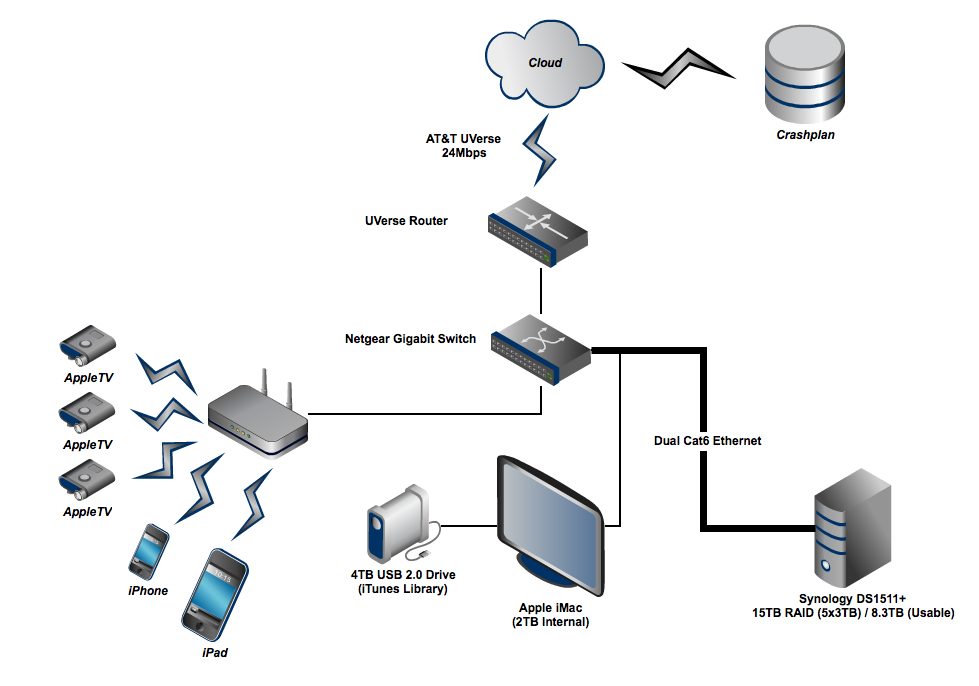
Overview: Network Design Diagram

You can see above the relevant elements of my home network topology.  It’s anchored to the internet via AT&T UVerse, which provides a 24Mbps down, 5Mbps up service over VDSL.  The router for my home network is plugged into an 8-port Gigabit switch, which is effectively the backbone for the entire house.  As part of the process of revisiting my network, I discovered that historically I had used a mish-mash of old Ethernet cables, some Cat 5, some Cat 5e, and it was affecting some connections.  A quick trip to Fry’s ensured that, for just a few dollars, I had Cat 6 cables for all Gigabit devices.  (This turned out to be important, particularly for connections to my iMac, wireless base station, and NAS box).

Basic Storage Topology

While my network supports a wide variety of clients, the backbone of my solutions is very Apple-centric.  As a result, my solution is optimized for the following decisions:

  • My media store is based on iTunes
  • My primary server is an iMac running Mac OS X 10.7 (Lion)
  • My on premise backup solution is Time Machine

I was able to simplify my storage needs for the network as follows:

  • The iMac uses the built-in 256 GB Solid State drive for the system & applications
  • The iMac uses the built-in 2 TB standard drive for local storage of most media (downloads, documents, pictures)
  • The iMac uses a 4 TB Seagate GoFlex External USB 3.0 drive for the iTunes library
  • The iMac and all other Macs in the house use Time Machine to backup to the Synology DS1511+, which has 8.3 TB usable space.

The Synology DS1511+ has dual Gigabit Ethernet ports, which allows for particularly good performance when multiple machines are trying to read / write to it at the same time.  Configuring the box to support Time Machine for multiple clients is not obvious, but I’ll write up a separate blog post on that issue.

Overall, the performance of this solution is excellent.  iTunes performance from the Seagate is excellent, both for the primary machine as well as for remote devices utilizing Home Sharing to access media (like the AppleTVs).  We are able to run video off this solution to all 3 AppleTV devices simultaneously with no issues.  Copying a 250MB file to the Synology box takes approximately 2 seconds, and it offers no measurable delay in terms of Time Machine incremental backups, viewing, and restoration.  The entire initial backup of 4.05 TB via Time Machine to the Synology box took approximately 26 hours.

Backup Solutions

Let’s not forget that the impetus for this entire redesign was the tragic and unnecessary demise of the Netgear ReadyNAS NV+, causing massive data loss.  Without belaboring the point, I hope that no one who reads this will ever make the mistake of buying a Netgear ReadyNAS.

That being said, it did lead me to significantly reconsider a multi-tier solution for document protection.

I would have loved to go purely with a cloud-based solution, but the performance is just not there yet for multi-terabyte systems.  Not only does it take an inordinate amount of time to upload terabytes to the cloud, but in the case of data loss, recovering the data would be equally slow.  Uploading 400+ GB to the cloud took me approximately 40 days… 4 TB would have taken over a year!

As a result, I factored my content into what I absolutely could not live without.  I settled on my 450 GB of photos and home movies that would be devastating if lost.  For $90, I subscribed to Crashplan Pro, which offers unlimited storage and came highly recommended by everyone.

As a result, for this crucial data, I have 3 levels of protection:

  • Primary storage
  • Secondary backup via Time Machine to Synology RAID can tolerate up to 2 disk failures simultaneously
  • Tertiary off site backup to CrashPlan

For the rest of my data, I have a fairly robust solution, but I’m considering storing 4 TB drive offsite somewhere periodically to add that “tertiary” level of security / safety.

Final Thoughts

The above solution may seem like overkill to some.  OK, probably to most.  However, you can simplify the solution above based on your needs.  For example, if you have only 200 GB of data to protect, maybe CrashPlan is the right “set and forget” solution for your network.  Maybe the 4 TB Seagate drive is sufficient for your Time Machine needs.

For those of you interested in the Synology box, I plan to write up a follow-on post on how to configure the Synology DS1511+ for Time Machine on Mac OS X 10.7 Lion.

Final Solution: Quicken 2007 & Mac OS X Lion

In July I wrote a blog post about a proposed solution for running Quicken 2007 with Mac OS X Lion (10.7).

Unfortunately, that solution didn’t actually work for me.  A few weeks ago, I made the leap to Lion, and experimented with a number of different solutions on how to successfully run Quicken 2007.  I finally come up with one that works incredibly well for me, so I thought I’d share it here for the small number of people out there who can’t imagine life without Quicken for Mac.  (BTW If you read the comments on that first blog post, you’ll see I’m not alone.)

Failure: Snow Leopard on VMware Fusion 4.0

There are quite a few blog posts and discussion boards on the web that explain how to hack VMware Fusion to run Mac OS X 10.6 Snow Leopard.  Unfortunately, I found that none of them were stable over time.

While you can hack some of the configuration files within the virtual image package to “trick” the machine into loading Mac OS X 10.6, it ends up resetting almost every time you quit the virtual machine.  I was hoping that VMware Fusion 4.0 would remove this limitation, since Apple now allows virtualization of Mac OS X 10.7, but apparently they are still enforcing the ban on virtualizing Snow Leopard.  (Personally, I believe VMware should have made this check easy to disable, so that expert users could “take the licensing risk” while not offending Apple.  But I digress.)

You can virtualize Snow Leopard Server, but if you try to buy a used copy on eBay, it’s still almost $200.00.  Added to the $75.00 for VMware Fusion, and all of a sudden you have a very expensive solution.  Worse, VM performance is surprisingly bad for a Mac running on top of a Mac.  In the end, I gave up on this path.

Enter the Headless Mac Mini

For the longest time, you couldn’t actually run a Mac as a headless server.  By headless, I mean without a display.  It used to be that if you tried to boot a Mac without a display plugged in, it would stop in the middle of the boot process.

I’m happy to report that you can, in fact, now run a Mac Mini headless.

Here is what I did:

  • I commandeered a 2007-era Mac Mini from my grandmother. (It’s not a bad as it sounds – I upgraded her to a new iMac in the process.)
  • I did a clean install of Mac OS Snow Leopard 10.6, and then applied all updates to get to a clean 10.6.8
  • I installed Quicken 2007, and applied the R2 & R3 updates
  • I configured the machine to support file sharing and screen sharing, turned off the 802.11 network, turned off bluetooth, and to wake from sleep from Ethernet.  I also configured it to auto-reboot if there is a power outage or crash.
  • I then plugged it in to just power & gigabit ethernet, hiding it cleverly under my Apple Airport Extreme Base Station.  It’s exactly the same size, so it now just looks like I have a fatter base station.

I call the machine “Quicken Mac”, and it lives on my network.  Anytime I want to run Quicken 2007, I just use screen sharing from Lion to connect to “Quicken-Mac.local”, and I’m up and running.   Once connected on screen sharing, I configured the display preferences of the mac to 1650×1080, giving me a large window to run Quicken.

I keep my actual Quicken file on my Mac OS X Lion machine, so it’s backed up with Time Machine, etc.  Quicken Mac just mounts my document folder directly so it can access the file.

Quicken: End Game

This solution may seem like quite a bit of effort, but the truth is after the initial setup, everything has worked without a hitch.  I’m hoping that once Intuit upgrades Quicken Essentials for the Mac to handle investments properly, I’ll be able to sell the Mac Mini on eBay, making it effectively a low cost solution.

For the time being, this solution works.  Mac OS X 10.7 Lion & Quicken 2007.  It can be done.


Trend Micro Keynote: Innovation & Inspiration

I had the opportunity yesterday to kick off the 2011 Trend Micro Engineering Summit with a keynote on Innovation & Inspiration.  It’s a topic I’m passionate about, and I appreciated the chance to put some key learnings together and present them to a great technology team.

The talk is broken into three sections:

  • Lessons from Distributed Computing about how to think about Distributed Organizations
  • Three types of Risk
  • Hackdays and Cultures of Innovation

I would definitely consider the slides “draft” quality, but worth sharing nonetheless.

Those of you who attended by “Ten Things I Learned About Product at LinkedIn” talk will recognize the Optimus Prime quotes.  What can I say?  I’m a sucker for the Transformers. (I will get those slides posted up here soon.)

Enjoy.


Steve Jobs, BMW & eBay

There have been so many articles posted on Steve Jobs in the past week, I really thought I wasn’t going to add one here on my blog.

However, yesterday, John Lilly wrote a great piece on Steve Jobs yesterday, and I realized I might have a story worth telling after all.  I find myself fortunate, in retrospect, to have joined Apple in 1996 as an intern, and then full time in 1997 just weeks before Steve Jobs took the helm as interim CEO.

A Tale of Two Meetings

As an outgoing intern of the Advanced Technology Group, I actually did attend the meeting that John describes in his blog post.  However, as a full time engineer on WebObjects, I also had the opportunity to attend a different all hands that Steve Jobs called for the entire Rhapsody team (the codename of the project that became Mac OS X).

If you haven’t read John’s post, it’s definitely worth reading in tandem with this one.  He does a great job capturing the insights from the ATG meeting.  Instead, let me add to the story with my recollection of the Rhapsody meeting that happened the same week.

(Note: It has been over fourteen years since the meeting, so don’t take this as a literal play-by-play.  I have no notes, so all quotes are from memory.  But this is how I remember it.)

The “Michael Dell” Meeting

The mood of the Rhapsody team meeting was energetic, but mixed.  More than any other group at Apple, the Rhapsody team required a combination of talent from both long time Apple engineers and newly merged NeXT engineers.  There was a palpable sense of excitement in the room, as particularly the NeXT team had a huge amount of respect for the “incoming administration”.  At the same time, there was an element of discontent around suddenly finding themselves part of a large company, and even some skepticism that Apple was salvageable.

Steve got on stage at the front of the room in Infinite Loop 4, and put a huge, larger than life picture of Michael Dell on the wall.  He repeated the news fodder that Michael Dell had been asked recently what he would do if he was running Apple Computer.  (At the time, Dell was the ultimate success story in the PC industry.)  Dell said that he would liquidate the company and return the cash to shareholders.

A few gasps, a few jeers and some general murmuring in the audience.  But I don’t think they expected what he said next.

And you know what? He’s right.

The world doesn’t need another Dell or HP.  It doesn’t need another manufacturer of plain, beige, boring PCs.  If that’s all we’re going to do, then we should really pack up now.

But we’re lucky, because Apple has a purpose.  Unlike anyone in the industry, people want us to make products that they love.  In fact, more than love.  Our job is to make products that people lust for.  That’s what Apple is meant to be.

What’s BMW’s market share of the auto market?  Does anyone know?  Well, it’s less than 2%, but no one cares.  Why?  Because either you drive a BMW or you stare at the new one driving by.  If we do our job, we’ll make products that people lust after, and no one will care about our market share.

Apple is a start-up.  Granted, it’s a startup with $6B in revenue, but that can and will go in an instant.  If you are here for a cushy 9-to-5 job, then that’s OK, but you should go.  We’re going to make sure everyone has stock options, and that they are oriented towards the long term.  If you need a big salary and bonus, then that’s OK, but you should go.  This isn’t going to be that place.  There are plenty of companies like that in the Valley.  This is going to be hard work, possibly the hardest you’ve ever done.  But if we do it right, it’s going to be worth it.

He then clicked through to a giant bullseye overlayed on Michael Dell’s face.

I don’t care what Michael Dell thinks.  If we do our job, he’ll be wrong.  Let’s prove him wrong.

All I can remember is thinking: “Wow. Now that’s how you regroup, refocus and set a company in motion.”  I had seen speeches by Gil Amelio in 1996, and there was nothing comparable.  Please remember, at this point in time it wasn’t at all obvious that Steve or Apple would actually succeed. But I felt like I’d witnessed a little piece of history.

Fast Forward: eBay 2006

That meeting left a huge impression on me that extended well beyond Apple.  Steve’s actions and words at Apple in 1997 represented the absolute best in leadership for a turnaround situation.

It wasn’t until 2006, however, that I found myself at another large technology company looking to rediscover itself.  In the summer of 2006, I was one of a relatively small number of product leaders to tour a draft of a new initiative at eBay called “eBay 3.0”.  Led by the marketing team, a small, strong team had done a lot of research on what made eBay different, and what people wanted from the eBay brand.  The answer was that eBay was fun, full of serendipity, emotion, thrill.  The competition of auctions, the surprise at discovering something you didn’t know existed.  This reduced into a strong pitch for eBay as “colorful commerce”.

I was excited about the research and the work, because it echoed some of the things I remembered about Steve & Apple, and the simple vision he had for a company that made products that people lusted for.  But I also remember voicing a strong concern to several members of the team.  I told them about Steve’s speech to the Rhapsody team, and asked: “Does eBay want BMW market share, or Toyota market share?”  At the time, eBay was more than 20% of all e-commerce, and all plans oriented towards growing that market share.

Unfortunately, eBay tried to do both with the same product.

It’s not typical for a large, successful public company to basically say market share doesn’t matter, and to drive a company purely around a simple focus and vision.  When things are the toughest, unfortunately, that’s when leadership and vision matter the most.

Final Thoughts

Who would have imagined that Apple would have the largest market capitalization in the world?  Who would have thought that in the year 2011 that Apple – not Microsoft, not Dell, not Sony – would be defining the market for so many digital devices and services?

Most importantly, who would have thought that a leadership mandate that eschewed market share would achieve such dramatic gains?

Apple so easily could have gone the way of SGI, the way of Sun.  Instead, it literally shapes the future of the industry.  All because in 1997 Steve was able to offer a simple and compelling reason for Apple to exist.  A purpose.  And it’s a purpose that managed to aggregate some of the most talented people in the world to do some of their best work.  Again and again.

So I will add here a simple thank you to Steve Jobs for that meeting, and for changing the way that I think about every company’s purpose – their reason to exist.  Rest in Peace, Steve.

Bug in iPhoto 11 with iCal Import for Calendars

This is one of those simple blog posts where I write about a frustrating problem, and how I worked around it.

The Culprit

iPhoto 11 and it’s Calendar feature.

The Issue

When you try to import iCal dates into a Calendar, it frustratingly deletes events if they “collide” on the same date.

Example

Let’s say you have two iCal calendars, one for your family birthdays and events, and one for your friends birthdays and events.  Let’s also say that your brother is born on April 11th, and your friend is born on April 11th.

When you import both iCal calendars into iPhoto, only one of the birthday events will show up.  This does not happen if both birthdays are in the same calendar – only if they are in two different calendars.

What’s worse is that this also affects the native support for holidays.  So any friends or family born on July 4th are definitely out of luck.

Solution / Workaround

It’s not perfect, but here is my solution:

  1. Uncheck the holidays checkbox on the calendar import.  This gets you one “clean” calendar import that won’t hit the bug.
  2. Go to iCal and export each of the calendars that you want to add to your iPhoto calendar.
  3. In iCal, create a new calendar called “2012 iPhoto Calendar” or something like that.
  4. In iCal, import each of the calendars you exported, in the order you want them to appear.  Add them to the new “2012 iPhoto Calendar” calendar.
  5. Once you are done, quit iPhoto.  It only detects iCal changes at launch.
  6. Launch iPhoto
  7. Import the new iCal calendar “2012 iPhoto Calendar”.  All your dates will appear, in the order you combined them.

Hope this helps someone out there.  For my rather elaborate family calendar efforts (which involve five separate family calendars of birthdays, anniversaries, and key dates), this was an essential fix.

Joining Greylock

Today, John Lilly put up a really nice note on the Greylock Partners blog officially welcoming me to the firm.  Needless to say, I’m both honored and excited to be joining such a great team.

We’re fortunate to be witnessing the explosive growth of not one but two incredible new platforms for consumer products and services: social and mobile.  Both are literally changing the fundamental ways that consumers interact with devices, and are rapidly changing the dynamics for building successful new products and services.  After spending the past four years helping to build out social and mobile platforms, I can’t wait to partner with entrepreneurs to help them build out the next generation of products and companies over them.

Over the past few years, I’ve shared a number of insights here on this blog about building great products and companies.  Here are a few that are worth reading if you are curious about how I think:

And of course, the most appropriate for this announcement:

For now, I just want to say thank you to Reid, David, John and the entire Greylock team.  I can’t wait to get started.

LinkedIn in LEGO: Q&A

Ever since I began showing the LinkedIn in LEGO sculpture, I’ve been shocked with how many questions people have about it.  There is definitely something about seeing a LEGO sculpture of this size in person that makes people want to know more.

So while this blog post is the official description of how and why I built the LinkedIn in LEGO sculpture, I thought a 20 questions format would be fun and useful.

Let’s Play Twenty Questions

  1. What gave you the idea to build the LinkedIn in LEGO sculpture?
    I was driving to work in May, and as usual I drove by the Google building that houses the Android team.  They have a tradition of putting a sculpture of each of their releases out based on the codename (“honeycomb”, “ice cream”, etc).  I love these sculptures, but they always bothered me because Google is techie, and there is nothing techie about playground sculptures.I immediately thought how much cooler they would be if they were made of LEGO bricks, and thought that LinkedIn actually had nothing “cool” in its lobby.  So the idea was hatched to build a LinkedIn LEGO sculpture for our lobby on the next InDay.

  2. How big is the sculpture in real life?
    It’s four feet tall, four feet wide, and one foot deep (approximately). 4′ x 4′ x 1′.

  3. Why did you pick that size?
    I tried to pick a size that was big enough to be visually impressive, and a good size for people to stand next to for photographs.  There was also some cost sensitivity, as the number of bricks required effectively goes up as a cubic function.

  4. How big is a LEGO brick anyway?
    There is suprising complexity to this question, but the most interesting aspect of designing with LEGO bricks instead of pixels is that they are not perfectly cubic. A LEGO “stud” is 8.0mm wide and 8.0mm deep, but is 9.6mm tall, giving you an effective 6/5 ratio to work with in your model design.

  5. How many LEGO bricks are in it?
    Unfortunately, I don’t have an exact figure.  I ordered 8,000 bricks from LEGO.com, but also purchased a large number from local LEGO stores.  It’s definitely over 10,000 bricks, but likely less than 12,000.

  6. Are they real LEGO bricks?
    I don’t know why everyone asks that question, but yes, these are regular lego bricks, mostly 2×8.  They are not Duplo bricks or any other no-name brand.

  7. How much does it weigh?
    I don’t have the exact weight, but the shipping weight of the LEGO bricks alone was over 170 pounds, and I purchased at least another 50 pounds of bricks from the LEGO stores.  Including the heavy stand, the sculpture is well over 200 pounds.

  8. Where did you buy them?
    I purchased the bulk of the bricks directly from LEGO.  We had to call and fax the order in because the online form won’t let you order more than 999 of any one brick.  Due to changes in the design made during construction, I ended up buying another several thousand bricks from the LEGO stores in Valley Fair and Hillsborough.

  9. How much did it cost to make?
    Total cost was fairly close to $5,000.  That includes the cost of the bricks, the supplies to build the stand, and other related expenses.

  10. How did you build the stand for it?
    Home Depot to the rescue.  The base is custom cut 3/4 inch plywood, framed by 2×4 lumber, with 6 200-lb furniture moving locking wheels underneath.  Once assembled, I spray painted matte black and screwed the 32×32 blue lego base tiles in a grid on to it.

  11. How did you come up with the design for the [in]?
    This was a bit tricky given the non-square dimensions of the bricks.  Based on 8.0mm width, I quickly determined the logo would be 160 studs wide.  Using the 5/6 ratio, this meant 133 bricks tall.  I took the official LinkedIn logo and reduced it down to a 160×160 bitmap.  I then resided to 160×133, and manually fixed symmetry errors that were introduced by applying the ratio.

  12. How did you build the four rounded corners?
    This was one of the more complicated parts of the construction, as the corners actually support most of the weight of the side walls.  As a result, they are built more broadly internally to ensure significant cross-dimensional support.  The top corners were also particularly fragile at first because of the lack of internal support.  For both the top & the bottom, I had to rebuild them three times to find the strongest pattern of bricks.

  13. Is the white [in] actually inset by one brick?
    Yes.  One of the trickiest aspects of the [in] was insetting it by one brick for effect, and then ensure that there was ample strength between the blue and white bricks.  I ended up building a hidden “3rd layer” behind the seam where the white & blue bricks meet to join the two layers every 10 rows.  I also used 2×3 bricks in several locations to lock in support for the hidden third row.

  14. How did you make the curves smooth?
    The rendering of the curves follows the 160×133 logo exactly.  It’s not perfectly smooth, but I think that’s part of the charm of a LEGO sculpture.  In this industry, we all love pixels at some level.

  15. What’s holding it up?
    The internal substructure is one of the things I failed to model in advance, and had to improvise on during construction.  I ended up making the internal support structure from LEGO bricks as well, which added over 2,000 bricks to the design.  Approximately every 32 studs, there is a “T-shaped” 8 stud clumn that is perpendicular to the walls of the sculpture.  The bricks for the walls of the sculpture are interleaved with these columns every other row, to provide corner-like strength to the entire span.  Every 40 rows, a horizontal beam four bricks tall is added between the columns, to ensure that the large, square walls don’t bend in on each other.  Lastly, there are “joints” internally that bind together the white and blue sections of the design every ten rows.  (see my original blog post for pictures).

  16. What was the hardest part about the design?
    There were a number of difficult challenges, but the most difficult aspect of the design was balancing unexpected stability and design issues with the inventory of bricks that I had available.  Then again, constraints are part of what makes any problem fun to solve.

  17. How long did it take to build it?
    It took about 90 minutes to build ten rows, so the total sculpture took just about 20 hours of effort, typically 1-2 hours per weekend and an evening here and there.  Since I spent about 3-4 hours modelling the design ahead of time in Photoshop and Excel (I needed to learn some niche spreadsheet skills and this Excel article really did the trick), and another 10-12 hours making trips to local LEGO stores, the grand total time is probably 40 hours.

  18. When did you get it done?
    The modelling was all done in my favorite work time, between 11pm & 2am.  I built the base on Father’s Day.  Most assembly was done at LinkedIn on weekends and the odd evening.

  19. How did you learn to do this?
    There was a surprising amount of useful information on blogs from consultants who build LEGO sculptures for a living.  LEGO, as you might guess, is pretty well covered on the web.  I also asked a question on Quora which provided a few useful tips.

  20. Where can I see it?
    It’s not on public display yet, but later this fall it will debut in the new lobby of 2029 Stierlin Court, LinkedIn’s main building.

If you have additional questions, feel free to post in the comments and I’ll do my best to answer them.  Be forewarned – I have no qualms about deleting inappropriate comments / questions.

Building LinkedIn in LEGO

I’m pleased to announce that a fairly large side project that I’ve been working on for the past two months is now complete.  The “LinkedIn in LEGO” sculpture is now ready for display in the LinkedIn corporate lobby.  Made up of over 10,000 LEGO bricks, the sculpture stands over four feet tall, and is fairly close to a pixel perfect rendition of the official LinkedIn logo.

Since building a LEGO sculpture of this size was a fairly large undertaking, I thought I’d capture the details of the project on this blog.

Concept: LinkedIn in LEGO

The idea for the project, to be honest, likely has more to do with a lifelong affection for LEGO bricks.  But this particular idea came to me in May, as I was driving to work.  Every day, I tend to pass the Google building that houses the Android team.  They have a fun tradition, which is to build a sculpture of the code name of each release of Android out in front of their building to celebrate shipping.  (Examples: Gingerbread, Honeycomb, etc).  While I love the public celebration of big releases, I thought how out of place the “kiddie” sculptures looked.  After all, Google is a tech company, the statues should be made of something geeky like LEGO bricks.

At the same time, I thought about how LinkedIn didn’t have any sort of large sign or sculpture in its entrance.  The idea for doing the LinkedIn logo in LEGO bricks was born.  I thought I’d be able to get it done in a single InDay – the one day per month LinkedIn has set aside for innovative projects & efforts.  That proved to be a wildly optimistic assessment of the level of effort involved.

Modeling the Sculpture

After some research online, I discovered the basic measurements of LEGO bricks.  They turn out to not be the same in all dimensions: LEGO bricks are 8.0 mm wide “per stud” and 8.0 mm deep, but are actually 9.6 mm tall.  As a result, to build a square you need to model in a 5/6 ratio of height in rows to studs in width.

I decided on a 4′ x 4′ x 1′ rough size, based on evaluating the stable size of our lobby desk, and estimating a good size for people to take a photo next to.  After all, this was intended to be a fun showpiece for guests of LinkedIn.

Given the above, the rough sizing came to:

  • 160 studs wide (~4 feet)
  • 40 studs deep (~1 foot)
  • 133 rows high (~4 feet)

I wasted a couple of hours trying to use the LEGO provided modeling software which they offer on their website.  Let’s just say, not only was the user interface beyond frustrating, but it really wasn’t designed for a project of this scale.  I had to abandon it and find a different way to model the structure.

Adam Nash, the Human 3D Printer

Initially, I created the base design for the “in” logo by taking the standard logo, and rendering it to a 160×133 bitmap in Photoshop.  I then hand-corrected the image to adjust for symmetry errors introduced by the 5/6 ratio in the resizing.  I then had a clean plan for 133 rows in two colors, blue & white.

To create the plan for the actual model, I decided to emulate a 3D printer, laying down each of the 133 layers individually, in order, from bottom to top.  Initially, I did this by hand on paper to handle the tricky first 8 rows which form the bottom “curve” of the logo.  I then moved all the numbers to my favorite modeling tool, Microsoft Excel, where I completed the rest of my modeling.

Each layer is simply a rectangle, two studs thick.  To model the curve, I had to think carefully about how to support the larger rectangle above it, using larger bricks to provide full support.

Once I completed the first 10 rows, I realized that I had made my first error: ignoring interlocking.  I quickly revised my plans to ensure that I alternated the brick pattern at the corners to ensure that the bricks alternated to provide strength and avoid seams.  This actually proved relatively easy (for example, for the regular blue rings, an odd row would be two rows of 160 bridged by two rows of 36, the next ring would be two rows of 156 bridged by two rows of 40.

As a human 3D printer, I was able to model each layer as a row in the spreadsheet.  For each layer, I would model all four sides.  Three of the sides were trivial, since they are all blue.  It was a simple breakdown of the number of bricks into some “standard” pieces: 2×2, 2×3, 2×4, 2×6 and 2×8. Each brick type got it’s own column.

For the face that contained the “in”, the modeling was more in depth.  Like the GIF format, I just modeled “runs” of each color broken down in the standard bricks.  Each “run” was broken into columns for the brick type (example: 22 blue would become two 2×8 bricks and 1 2×6). I then introduced the “jitter” of 2 studs on each side from the alternating corners.

In the end, I had a giant spreadsheet where totaling every column gave me an inventory of bricks that I would need to order.  I then tallied up each brick and rounded up generously to cover the typical 10-15% materials overage that I’ve experience on home improvement projects.  The adjusted total came to almost exactly 8,000 bricks.

Ordering the Bricks

It turns out ordering 8,000 bricks (including over 5,500 2×8 blue bricks) is not a trivial exercise.  LEGO.com blocks you at 999 bricks per type, and chokes over a certain dollar amount.  Instead, after calling LEGO, it turns out that you can place an order via fax, which is what we did.  In case you are wondering, the Danish don’t seem to have a concept of a “volume discount” or “corporate discount”.  Either that, or they knew I’d pay for the bricks.

Unfortunately, fulfillment was ridiculously slow, with no way to accelerate.  They promised 10-15 days, but the reality was some bricks arrived in 2 weeks, some didn’t arrive for 6 weeks.  It was incredibly frustrating, and they didn’t seem to be set up to provide UPS tracking numbers, although we did get a couple through persistent calling.

Building the Base

On June 19th, I kicked off the project with a trip to Home Depot.  I knew that the final sculpture would be heavy, and that it would have to be movable.  So I got a custom cut piece of 3/4 plywood and 2×4 lumber to frame it.  I also got heavy-weight furniture dolly wheels (six).  Framing was fairly simple, and then I spray painted it matte black so it would be relatively invisible.

Once the base was dry, I carefully measured out ten 32×32 blue LEGO plates, and glued them down to the base.  Once the glue was dry, I screwed them down to the base to ensure no issues.  I used the first few rows of bricks to ensure that I had the plates properly spaced, since there is an interesting but necessary 0.2 mm spacing that you have to account for with LEGO bricks.

Assembly

Once LEGO shipped the first few boxes of bricks, I tried to get started with what I had.  I initially built the structure layer-by-layer, but quickly realized it was much quicker to build a small number of rows at the same time.  It made the “staggering” of the bricks much easier.

Unfortunately, despite all of my modeling, I quickly realized that I had to make some significant modifications.  As result, every layer became a realtime adjustment of the model to accomodate what became three crucial issues that I hadn’t accounted for.  They all revolved around the stability & structure of the sculpture as it grew upward.

Design Modifications: Interior Support

I knew that I had cut corners by making the sculpture only 2 studs thick.  Most sources I had found online recommended making the walls 4 studs thick, and even potentially building an interior structure out of wood or PVC pipe.  Unfortunately, I was trying to keep the budget for the sculpture down, and decided to risk a 2 stud approach.  Once I had the bricks, I quickly realized I needed to course correct.

My first modification was to add “columns”.  Every 32 studs or so, I added an 8-stud interior column to form a regular “T shape” with the wall.  The intention was for this to provide some direct support to the walls from falling inward.  While this modification was successful, 8 columns * 133 rows = 1064 additional bricks, and it introduced 8 new junction points that had to be interleaved between odd & even rows for strength.  This modification alone made my original LEGO order insufficient in terms of both size and quantity of bricks.

My second modification were “beams”.  The columns were workable until about 30 rows high, when I noticed that the walls were starting to bend inward a bit.  Knowing that I had over 100 rows left, I had to find a more robust way to square the walls on an ongoing basis.  As a result, I decided to build horizontal beams out of 2×8 LEGO bricks, four bricks deep.  These beams were introduced between the columns, and really reinforced the strength of the structure when pushed from the outside.  I decided to add beams across the columns every 40 layers for strength.

The third modification were “joints” between the blue and white bricks.  When I had modeled the structure, I didn’t consider the obvious fact that because the blue & white were by definition separate bricks, there would be a huge vertical seam, measuring 60+ rows in some cases, where the two colors met.  This was a major weakness, and would lead the letters to buckle inward.  As a result, I designed a “joint” that involved using a hidden “3rd stud” of depth to connect the blue & white bricks with 1×10 bricks, and locking them above & below with 2×3 blue bricks.  By placing these joints every 10 rows, in every location where white met blue, I was able to provide enormous strength to the integrity of the letters.  (I had several office mates “test” this strength, much to my chagrine.)

Inventory Issues: LEGO Stores

All of these modifications, however, led me to need a significant number of new bricks, and in some cases, different sizes than I had ordered.  Given the slow shipping from LEGO, I was worried about ever finishing when I discovered that two large LEGO stores (Valley Fair & Hillsborough) were near by.

There I discovered a few unfortunate facts:

  • They don’t stock most bricks by color and size
  • They don’t have any way to predict which bricks they get week to week (they get supplied on Mondays)
  • They only sell bricks by the cup ($15) or the box ($70)

Needless to say, I made a lot of trips to the stores, and modified my design to accommodate whatever sizes I could get.   Despite the churn, the truth is modifying the design to these new constraints was actually part of the fun.  In the process, I was fortunate enough to find appropriate tiles to smooth out some of the exposed studs, and I was able to figure out a good solution for the “roof” of the sculpture.

Company Event: Time Capsule

As the sculpture came together, I was a bit surprised at how many of my co-workers mentioned to me that it would make a great time capsule.  Because it’s hollow, people seemed to naturally want to put messages in it before it was sealed.

For fun, on August 26th we invited everyone in the company to fill in a card with their prediction for LinkedIn in 2021.  Over 400 cards were filled out and placed in the sculpture.

Final Touches: Dedication & Protection

Once the sculpture was completed, it felt natural to want to dedicate the sculpture in some way.  After circulating some ideas, we had a plaque made that made the sculpture a gift from the employees of 2011, which fit the original concept and theme of the project.  We also decided that it was just too tempting for people to lean on, or worse, climb on the sculpture.  Since that wouldn’t last long, we ordered a large plexiglass box for the sculpture, to keep it protected in the lobby.

Final Thoughts

The final sculpture measures pretty true to design: 4′ x 4′ x 1′.  More impressively, it does successfully move, even though it weighs well over 200 pounds.

I’d say I spent about 20 hours in assembly time (nights / weekends), and about the same in overhead (modeling / travel / overhead).  I’m including in the modeling time the periodic “refactoring” where I would tear down pieces and reassemble as I figured out better solutions for certain sections.

There’s something deceptive about looking at photos of it.  I think there is, deep within most techies, a fascination with objects that are made of a very large number of small objects.  Call it pixel-lust.  But there is clearly something really fascinating about seeing a sculpture like this in real life.  People run their fingers over it, watch the light play off the seams.

Over all, it came out better than expected for a first attempt, especially given that I hadn’t attempted anything like this before.  Of course, like any engineer, I’m convinced that now that I have the system, I could do a much better job the second time…

Step by Step Photos

These are some photos that were taken during construction.  They include:

  • Detailed photos of the base stand itself, and the attachment of the lego baseplates
  • Step-by-step photos of the construction, taken approximately every 10 rows
  • Interior shots of the sub-structure, including the columns, beams, and joints to attach the blue/white bricks internally
  • Some fun shots of people posing with the statue, or putting their “time capsule” predictions inside
  • The final sealed version from a few angles


Designers: Getting the Most Out of Your Product Manager

I gave a lighthearted talk yesterday at the LinkedIn User Experience team’s all hands meeting. I called it “Getting the Most Out of Your Product Manager”, and it was intended to talk from the perspective of someone who has lived in both of the HCI (Human Computer Interaction) & PM (Product Management) worlds.  The goal of the deck was simple – by explaining to designers and user experience professionals what makes a great product manager and how they are held accountable, it more obvious why occassionally PMs & Designers can clash.

There are some inside jokes so it might not be as funny to everyone, but it was popular enough that I thought I’d share it here.

As a side note, it was truly amazing to see such a large and amazingly talented group of designers and web developers arranged together.  Incredible validation of a simple truth – that if you want great user experience, you need to foster a culture and process that not only attracts the best talent, but also lets them do their best work.

It’s hard to believe that it was only in 2007 that we started down the path of having a formal UED team at LinkedIn.  When you see products like the recent LinkedIn mobile products, it’s worth remembering that great designs come from great teams.