LinkedIn as a Platform

From the first conversations that I had with Reid Hoffman about LinkedIn, what was striking was the amazing clarity about how value is created by social web properties.  Those conversations turned into one of my favorite talks, where I walk through the basic understanding of LinkedIn as a Platform business for students and new hires.

Since it’s a such a popular framework, I thought I’d capture an outline of it here so that others can benefit from it.  There is nothing here that won’t be familiar to industry insiders and folks who focus on social software.  However, I’ve found that most people, especially technologists who have not had first hand experience with social platforms, seem to find this useful & interesting.

LinkedIn as a Platform

I started my career as a software engineer, and as a result, I’ve always had a very technical view of what defines a platform.  Across multiple decades, platforms tended to be defined by technical constructs: entities and services that are exposed to software developers.

What’s most interesting about the social web is that, for the first time, technology is necessary but insufficient to deliver a successful platform.  So while LinkedIn is a technology company and great technology is a prerequisite for a great platform, it’s important to understand that in this generation great technology alone won’t ensure success.

Why the Social Web is Different

The reason why technology alone isn’t sufficient is due to the simple fact that on the social web, the true value of the platform extends from the users themselves.

First and foremost, users interact with each other.  At LinkedIn, the very first type of interaction was the simple act of connecting.  If you look at Web 1.0 companies, they spend an inordinate amount of money on user acquisition.  On social properties, user acquisition is effectively free because users generate activity, and that activity brings in other users.  This activity can be an invitation, a message, a comment, a like – any way that one person can reach out and contact another user.  More importantly, as a metrics-oriented product manager I can tell you, the likelihood that a person will respond to another person is easily an order of magnitude (10x+) higher than the response rates of a person to a company.  (Just think about your inbox and you’ll see it’s obviously true.)

What’s interesting about all of this user activity is that, in fact, activity itself is a form of content.  When someone responds in a group, comments on a status update, votes on a poll, or answers a question, they don’t just interact with other users – they also create content.  That content, as it turns out, becomes a catalyst for other people to engage and interact.
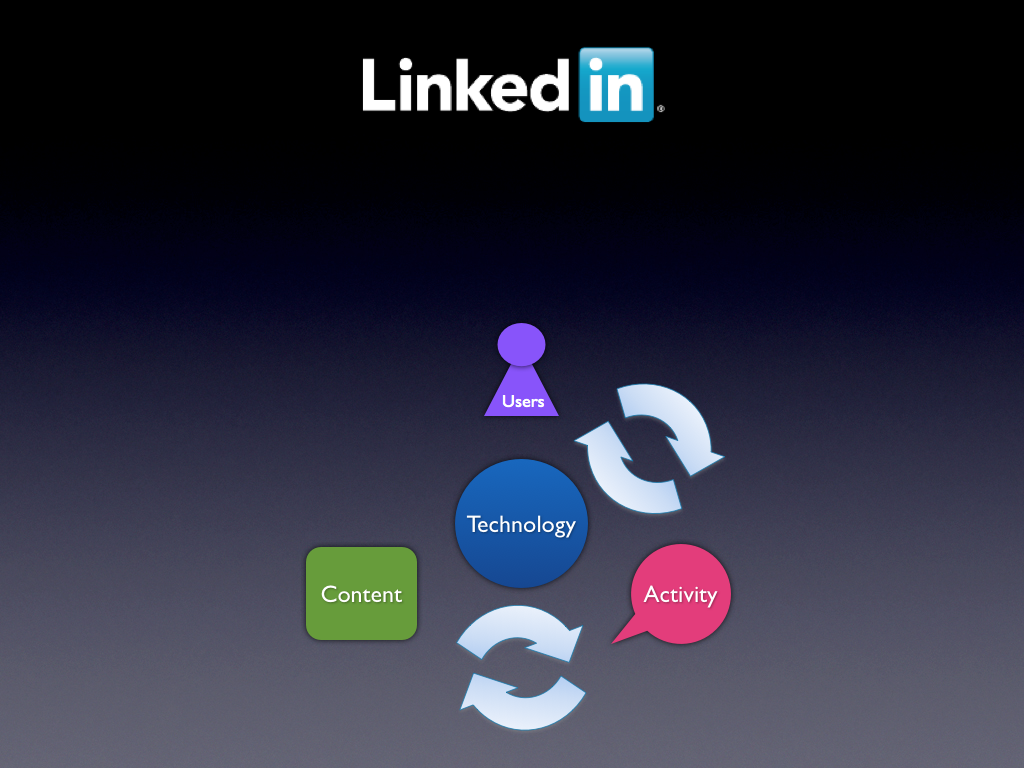
In fact, one of the primary aspects of a social platform is that users generate content.  Once again, looking back at the Web 1.0 generation of websites, content creation was one of the most challenging things to economically scale.  On social websites, users generate the bulk of the content.  What’s more, that content itself drives additional users to the site.  For example, the very first type of content that users created at LinkedIn was their professional profile.  Users discover this content via search engines, applications, and social distribution, and they join LinkedIn to engage with that content.

When developers want to connect with the LinkedIn platform, whether they are giant companies like Microsoft and SAP or tiny startups, the technology is just the means.  What they really want to connect to is this incredible engine of professionals, content, and activity.  It’s this vibrant, circulating, and growing engine of content that developers want to connect to.  This entire engine is really the LinkedIn platform.

Businesses Built Over the Platform

LinkedIn has had an open developer platform since late 2009, but it was in very early days that the company realized that it was fundamentally a platform business.

Despite it’s popular reputation as a site that has always made money, for the first few years LinkedIn did not focus on monetization at all.  There was always a high degree of confidence that if you could aggregate the world’s professionals and understand their reputations and relationships, it would be a new and incredibly valuable ecosystem.  However, around 2005 and into 2006, LinkedIn began experimenting with a few different theories on what the best way to build a sustainable business over this platform.

One theory was that, when you pull together a huge number of professionals, there would be an opportunity for hiring managers and companies to find great talent.  This was the precursor to the “Hiring Solutions” family of products.

Another theory was that, when you pull together a huge number of professionals, there would be an opportunity for companies to reach professionals with their products and services.  This was the precursor to the “Marketing Solutions” family of products.

Yet another theory was that there would be a small percentage of power users who would be willing to pay money for additional search and communications capabilities.  This was the precursor to the “Subscriptions” family of products.

Now, all of this pre-dates my joining the company, but what is truly amazing about this story is that, very quickly, all of these businesses worked.  And by worked, I mean they started immediately generating interesting and growing revenue.  This is also why LinkedIn slammed to positive cash flow so early in its history, and why the first party I got to attend when I joined the company was the “In the Black” party where the company celebrated that milestone.  (It was a good party.)

I can’t tell you how unique it is to have a technology startup that finds not one, but three potentially huge revenue streams early in its history.  In fact, most venture capitalists tend to prefer that companies find a single business model to execute against.

But the truth is, this was the catalyst for realizing an important fundamental truth: the LinkedIn platform is an incredibly powerful and valuable ecosystem, and that multiple great businesses can (and will continue) be built over it.

Where LinkedIn Spends Most of Its Time

One of the great things about LinkedIn as a company is that there is incredible alignment across the company about how our ecosystem creates value.  The value comes from the vibrancy of the professional network itself.

This is why, across the company, you’ll see that the vast majority of energy is spent on figuring out how to leverage this platform of professional identity and insights to make LinkedIn more useful, more often to professionals globally.  It turns out that the more professionals, the more activity, the more content created, the more value is created for all of LinkedIn’s businesses.

This is why LinkedIn puts their members first.  Our job is to connect the world’s professionals, and make them more productive and successful.  The rest follows.

Extending LinkedIn Across the Web

As LinkedIn extends itself as a true professional operating system for the web, the incredible volume and velocity of professional identity and insights will provide value to a whole new generate of web, desktop, mobile and enterprise applications.

The Big Problem with Transformers 3

I’m writing this blog post as a favor to Alex Gyr, who apparently likes it when I rant about movies.  And after all the fun commentary on my post on the Problems with the Star Trek Movie Reboot, it has been too long since I flamed a hot summer movie.

The Transformers Brand Promise

Look, I’m not going to complain about the acting, the actors, the plot, the length or the production value.  Truth be told, I don’t expect a lot from a big budget remake of a popular 1980s cartoon.  I’m in the core demographic and I’m super forgiving.

However, I do expect just two things from the Transformers.  Just two.  And they didn’t give it to me.

I want to see robots, and I want to see those robots transform

Seriously.  It’s not more complicated than that

Enough with the Humans

OK, so given the premise, let’s look at what we actually got from the movie.

First, at least one full hour of the movie, if not more, is dedicated to the drama and suspense around the humans in the story.  Will they understand?  Will they make it?  Can they fix it?  Can they save the day?

Please.  There are hundreds of movies I can go to this year to see plots about humans.  Believe me, most of them will be better.

Enough with the humans.  When I go to a Transformers movie, I want to see robots.

What Happened To Transform?

That’s not the worst of it.  For the half of the movie that does include robots, there is the second problem. They don’t transform!

I know, it sounds ludicrous, but let me say it again.

Part of the plot includes about 200 deceptigons descending onto Earth for global domination.  They don’t transform.  They just fight as robots.

Why even call them Transformers?  They are supposed to be robots in disguise, not just robots.  Let’s just call the movie: “Humans and Robots 3: All the Same, All the Time”.

Message to Paramount

Every brand has a reason to exist, and Transformers definitely has a reason to exist.  It exists to provide people with a colorful futuristic world where there are robots that transform.

If you make a Transformers 4 (and let’s be clear, I hope you do) please make sure if possible to make the movie about robots that transform.  You will get the full ticket price (3D IMAX) from me.

RIP Resume. Apply with LinkedIn is now Live.

Just a quick blog post tonight, after a full day of meetings explaining the new Apply with LinkedIn plug-in that we launched today.

Jon Seitel put up a great blog post on LinkedIn about the feature. I’m not going to try to duplicate here, but for those of you curious about what we launched today, here’s the intro:

Our goal with Apply with LinkedIn is to help every professional put their best foot forward, anywhere across the web, when they take that leap to apply for a new position, a dream job.

We are going to make it easy for you to submit your profile for any job application on the web with one simple click.  Some of the first companies to debut “Apply with LinkedIn” button on their company websites (besides our own) include Netflix, TripIt, Photobucket and over a thousand other companies. In addition, we’re also working closely with the top Applicant Tracking Systems (ATS) to help them and their customers match the best candidates for the right jobs.

Instead, I just want to use this space on my personal blog to say thank you to the full team at LinkedIn for taking this concept from vision to reality. With all great products simplicity can be the most difficult goal to achieve. Apply with LinkedIn will permanently change the way millions of professionals find their next great opportunity, and the way companies will find their best talent.

Apply with LinkedIn is just an early example of what LinkedIn can achieve as it builds out it’s vision of a professional operating system for the web.

So a special thank you to the whole team in Mountain View.

Now, Next Play.

‘Twas The Night Before Hackday

A quick parody of a classic to celebrate the LinkedIn Hackday tomorrow (July 15th).  Apologies in advance for the inside jokes / names.  It may not make complete sense to those of you who are not LinkedIn employees.

Twas the night before Hackday, when all through LinkedIn
Not a person was stirring, not even Stegman.

The fridges were stocked with cans of Redbull

The cups were all stacked, the bins were all full.


The hackers were nestled with text editors,

The build was still stable, with normal errors.

iPhones were docked, and Droids were all sleeping,

And MacBooks were purring with power lights breathing.


All of a sudden the InGraphs start flashing,

The NOC is alerted; what is now crashing?

Henke & Kevin were quickly online,

What could be causing this kind of flatline?


Before the team could dive into root cause,

The problems had ended and everyone paused.

Elliot checked, and the metrics were fine

2011 would be over the line.


Suddenly a voice boomed from across the LinkedGym

There was no doubt: the Wizard of In!

He comes every month, for the same simple reason:

Hackday is coming, and it’s coding season


“Forget all your meetings, tell Outlook to shove it.

Hackday’s for coding, just try it, you’ll love it.

Inspire your colleagues, show what you wrote,

Win their applause, and count Twitter votes!”


The Wizard began to run even faster,

and shouting the names of past Hackday Masters,

“Go Crosa, go Ragade, go Efrat & Heuser. Go Gillick, go Jiong, go Blackburn &
Brikman.
Go John, go Matthew, go Shoup & Grishaver. Go Peter, Go Sam, Go Shannon &
Vikram.”

As he ran by the kitchen, he stopped for a second:

“I need a Coke Freestyle, this thing is just heaven.”

Quick as he came, he ran out the door,

“Happy Hackday to all, you are all h@x0rs”

How to Make a Great T-Shirt: Metrics

This is the third post in my series on “How to Make a Great Tech T-Shirt“.

Define Success to Achieve Success

On the consumer web, product managers succeed and fail based on their ability to define, measure and understand their product metrics.  When new Product Managers start at LinkedIn, one of the first tasks that I give them is to thoroughly reassess the metrics in the area they are taking over, and prepare a new set of metrics that they will use to measure success with their area on an ongoing basis.

As a result, it’s not completely surprising that I believe that if you want to make great t-shirts for a technology organization, you have to first define a clean, objective measure of success.  You then have to experiment, measure, learn and iterate to produce truly great t-shirts.

Key Metrics: T-Shirt Success

The key to a good metric is simple.  Objectivity.  The problem with t-shirts is that *everyone* has an opinion about what they want in a t-shirt.  Unfortunately, almost no one has ever tested out their pet theories in an objective way.  Thus, T-Shirt choices get made based on the personal opinions of the people making them, rather than what will be most successful for the organization.

Over my years of making t-shirts at LinkedIn, I’ve narrowed my success metrics to a simple measure:

  • What percent of people who received a t-shirt wear it after a 1 month, 3 month, 6 month, and 12 month time periods

That’s a lot to absorb, but it’s really quite simple.  Let’s say you made 100 t-shirts in October 2009:

  • How many people wore your t-shirt to work in November 2009?
  • How many people wore your t-shirt to work in January/April/October 2010?

Clearly, if the more people wearing your shirt on an ongoing basis, the more successful your shirt was at achieving its objectives.

If You Make A T-Shirt and No One Wears It…

  • Q: If a tree falls in the woods and no one is there to hear it, did it make a sound?  (A: yes)
  • Q: If you make a t-shirt and no one wears it, was it worthwhile to make a shirt? (A: no)

In my blog post, Why T-Shirts Matter, I outlined over half a dozen reasons why t-shirts are important to technology organizations.  None of those justifications come true, however, if no one wears the t-shirt.  That’s why success is defined by how often people wear the t-shirt, and for how long.

If you’ve made t-shirts before, then you probably recognize the pattern of failure.  In the failure case, everyone takes a t-shirt, but somehow, you never see people wear them around the office.  Sure, maybe a couple people wore them the day after you handed them out.  But a few weeks later, it’s like they never existed.  When you ask about them, people tell you “Oh, I wear it on the weekend” or “I use it for the gym”.  Listen, let’s be honest.  A lot more people in technology talk about going to the gym than actually doing it.  These are the white lies people tell you to avoid telling you the truth: “I took a t-shirt because, for some uncontrollable reason, I have to take any t-shirt that is offered.  But I’m never going to wear it.”

Experiment With Your Shirts

You should be making at least one new t-shirt per quarter for your technology organization, so you have time to learn and experiment.  As we go through the upcoming blog posts on t-shirt quality and design, you’ll see that there are a variety of choices.  There is no one universal answer, but if you are attentive to what t-shirts “work” in your organization, you’re more likely to make new t-shirts that work.

For example:

  • Should you make women’s sizes?  The answer is simple – if it increases the number of people who will wear the shirts to the office and for longer, then yes, you should.  (At LinkedIn, this is absolutely true.)
  • Are certain colors more successful than others?  Absolutely.  (At LinkedIn, the best colors are black, navy, charcoal grey, and heather grey).
  • Should you spend more on higher quality t-shirt manufacturers and materials?  Absolutely.  T-Shirts that go bad quickly or shrink end up never getting worn.  Better to spend $12 for shirts you’ll see for the next two years than $5 on shirts you won’t see again.

I think the more you think about the simplicity of this metric, the more you’ll see that it will help you quickly spot at your workplace what are the shirts people love, and thus which shirts were worth the time & money.


How To Make A Great T-Shirt: Goals

This is the second post in my series on “How to Make a Great Tech T-Shirt“.

Know Why You Are Making the Shirt

Believe it or not, one of the most important steps in making a great t-shirt is having clarity on why you are making the shirt in the first place.

In my original blog post, “Why T-Shirts Matter“, I covered a lot of the high level reasons that T-Shirts are important for high tech companies.  In terms of setting goals for your project, however, it’s important to clearly understand the purpose of the t-shirt.

  1. Celebrating a Product Launch.  This is a common shirt at high tech companies, and represents a type of wearable trophy for the team.  Typically, these t-shirts don’t go to everyone at the company, unless the product really is a company-wide event.  These shirts tend to focus primarily on the product name, rather than the team or company.
  2. Team Identity.  New teams are creating in technology organizations periodically.  When they are formed, there’s always a challenge communicating to the rest of the company that the team exists, and establishing a sense of pride in the new entity.  T-Shirts can solve this problem elegantly.  These shirts typically are made only for the team itself, but in some cases, giving them out to the whole company can help establish visibility more effectively than any number of company-wide emails or announcements.
  3. Event.  These shirts are made to celebrate an event or a one-time program.  This can be a news event, like announcing a milestone for the company, or a company-wide function like a summer picnic.  These shirts tend to focus on a combination of the event and the date, providing living proof that “you were there”.  Typically, they are given only to the people who helped attend the event.
  4. Publicity.  These shirts tend to skew towards the Marketing side of the house, but sometimes shirts are made in volume to help publicly represent the company or a product.  They are designed to be mass replicated, and typically have more cost constraints due to the volume.  Ironically, most people inside the company don’t get these shirts, since they are produced for potential customers or partners.
  5. The Company Shirt.  These shirts are generic, but are the simple, best representation of the company.  There’s no excuse for these shirts not to be high quality and well thought out.  Once they are designed, they tend to be replicated over and over again since they are a staple for both new employees and giveaways.

The reason that picking a goal matters is that when we get to different design options, the purpose naturally affects the choices you make in terms of text and design.  If a shirt is being distributed outside the company, for example, typically simple representation of the brand is preferred.  The smaller the audience, the more idiosyncratic it can be.

Example: LinkedIn for Android

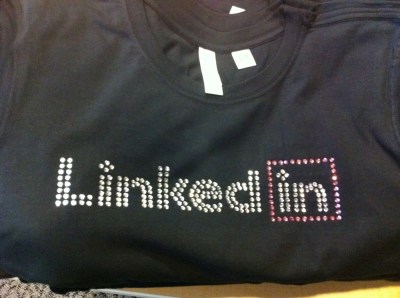
For example, this shirt was made to celebrate the launch of LinkedIn for Android (Goal #1):

This was the front of the shirt.  The back just says: “LinkedIn for Android”.  We printed it on an American Apparel tri-blend shirt (50% poly, 25% cotton, 25% rayon), in a very fitted / modern cut.  (Thanks to @bhaggs on the Twitter team – got the idea for the shirt type from their company shirt).

The truth is, this was a high enough quality execution that we easily could have morphed this to Goal #3, since basically the whole company wanted one.  That’s not atypical when you execute Goal #1 or Goal #2 particularly well.

We’ll cover more design options in an upcoming post.  For now, if you are beginning a t-shirt project, it’s worth thinking ahead of time what the goal of your project really is.

How To Make A Great Tech T-Shirt

Late last year, I happened to write one of my most popular blog posts ever called: Why T-Shirts Matter

One the best t-shirts: LinkedIn Breast Cancer Awareness T-Shirt 2010

Since then, this blog post has been viewed over 36,000 times.  It has been referenced from Hacker News, TechCrunch, Zazzle, and many other blog posts.

Ironically, that blog post has a cliff hanger at the end of it:

It turns out that this is a lot harder than it appears.  Mario always tells me my blog posts are too long, so I’m going to save this topic for the next post…

So Where Is It?

One of the most common questions I get now is “when are you going to write the post on how to make great tech t-shirts?”  Let’s be frank – it has been over eight months since the original post.  Procrastination is one thing, but at this point you’ve got to wonder whether or not this is a Duke Nukem situation.

One Post or Eight?

One of the reasons I haven’t been able to put this post together is that there really is a lot to cover.  I’ve spent quite a bit of time thinking about this problem, and as a result, I’ve accumulated quite a bit of content on it.

So I’ve made a decision.  Rather than tackle this beast all at once, I’m going to turn this into a theme for this week.  Every day, I’ll post another aspect of how to make a great tech t-shirt.  At the end, I’ll add a summary post for those of you who prefer cliff notes.

How To Make a Great Tech T-Shirt

  1. Introduction
  2. Goals: Why Are You Making the T-Shirt
  3. Metrics: How Do You Measure Success
  4. Quality: Picking the Right T-Shirt
  5. Design: Styles That Work
  6. Execution: Avoid the Camel
  7. Operations: Collecting Sizes, Ordering & Distribution
  8. Summary: How to Make a Great Tech T-Shirt

Tomorrow, I’ll begin the series, adding links here as an index.  Can’t wait to get started.

Proposed Solution: Quicken 2007 & Mac OS X Lion

Right away, you should know something about me.  I am a die-hard Quicken user.  I’ve been using Quicken on the Mac since 1994, which happens to be the point in time where I decided that controlling my personal finances was fundamentally important.  In fact, one of my most popular blog posts is about how to hack in and fix a rather arcane (but common) issue with Quicken 2007.

So it pains me to write this blog post, because the situation with Quicken for the Mac has become extremely dire.  Intuit has really backed themselves into a corner, and not surprisingly, Apple has no interest in bailing them out.  However, since I love the Mac, and I love Quicken, I’m desperately looking for a way out of this problem.

Problem: Mac OS X Lion (10.7) is imminent

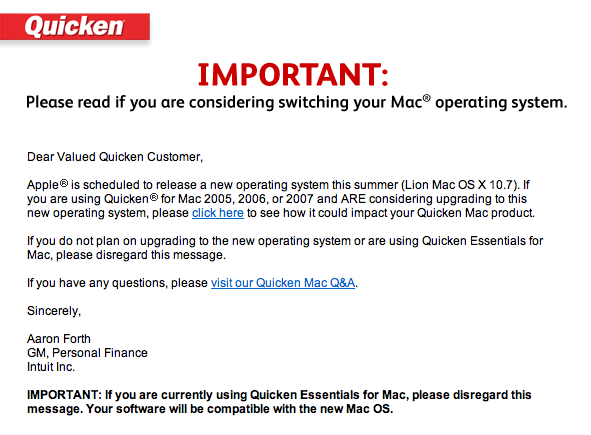
Yesterday, I got this email from Intuit:

It links to this blog post on the Intuit site.  The options are not pretty:

  1. You can switch to Quicken Essentials for Mac.  It’s a great new application written from the ground up.  In their words, “this option is ideal if you do not track investment transactions and history, use online bill pay or rely on specific reports that might not be present in Quicken Essentials for Mac.” Um, sorry, who in their right mind doesn’t want to track “investment transactions”?  Turns out, at tax time, knowing the details of what you bought, at what price, and when are kind of important.  At least, the IRS thinks so.  And they can put you in jail and take everything you own.  So I’m going with them on this one.  No dice.
  2. You can switch to Mint.  I love Mint, and I’ve been using it for years.  But once again, “This option is ideal if maintaining your transaction history is not important to you.”  Yeesh.  For me, Mint is something I use in addition to Quicken.  Unfortunately, Mint is basically blind to anything it can’t integrate with online.  Which includes my 401k, for example.
  3. You can switch to Quicken for Windows.  Seriously? 1999 called and they want their advice back.  Switch to Windows?  Intuit would get a better response here if they just sent Mac users a picture of a huge middle finger.  By the way, to add insult to injury:  “You can easily convert your Quicken Mac data with the exception of Investment transaction history. You will need to either re-download your investment transactions or manually enter them.”

This is an epic disaster.  I’m not sure how many people are actually affected.  But the Trojan War involved tens of thousands of troops, so I’m going with Homer’s definition of “Epic”.

What’s the Problem?

There are really three issues at play here:

  1. Strike 1. Around 2000, Intuit made the mistake of abandoning the Mac.  Hey, they thought it was the prudent thing to do then.  After all, Apple was dying.  (The bar talk between Adobe & Intuit on this mistake must be really fun a few drinks into the evening.)  Whoops.  This led Intuit to massively under-invest in their Mac codebase, yielding a monstrosity that apparently no one in their right mind wants to touch.  From everything I hear, Quicken 2007 for the Mac might as well be written in Fortran and require punch cards to compile.  Untouchable.  Untouchable, unfortunately, means unfixable.
  2. Strike 2. Sometime in the past few years, someone decided that Quicken Essentials for the Mac didn’t need to track investment transactions properly.  I’ve spent more than a decade in software product management, so I have compassion for how hard that decision must have been.  But in the end, it was a very expensive decision, and even if it was necessary, it should have mandated a fast follow with that capability.  It’s a bizarre miss given that tracking investment transactions is a basic tax requirement.  (See note on the IRS above)
  3. Strike 3Apple announces the move from PowerPC chips to Intel chips in June 2005.  Yes, that’s *six* years ago.  Fast forward to June 2011, and Apple announces that their latest operating system, Mac OS X Lion, will not support the backwards compatibility software to allow PowerPC applications to run on Intel Macs.

Uh oh.

This is Intuit’s Fault.

With all due respect to my good friends at Intuit, this problem is really Intuit’s fault.  Intuit had six years to make this migration, and to be honest, Apple is rarely the type of company to support long transitions like this.  You are talking about the company that killed floppy drives almost immediately in favor of USB in 2000, with no warning.  They dropped support for Mac OS Classic in just a few years.  It’s not like Apple was going back to PowerPC.

If you examine the three strikes, you see that Intuit made a couple of tactical & strategic mistakes here.  But in the end, they called several plays wrong, and now they are vulnerable.

Intuit would argue that Apple could still ship Rosetta on Mac OS X Lion.  Or maybe they could license Rosetta to Intuit to bundle with Quicken 2007.

Apple’s not going to do it.  They want to simplify the operating system (brutally).  They want to push software developers to new code, new user experience, and best-in-class applications.  They do not want to create zombie applications that necessitate bug-for-bug fixes over the long term.  Microsoft did too much of this with Windows over the past two decades, and it definitely held them back at an operating system level.

A Proposed Solution: VMware to the rescue

I believe there is a possible solution.  Apple has announced that Mac OS X Lion will include a change to the terms of service to allow for virtualization.  If this is true, this reflects a fundamental shift in Apple’s attitude toward this technology.

The answer:

  • Custom “headless” install of Mac OS X 10.6.8, stripped to just support the launch of Quicken 2007.
  • Quicken 2007 R4 installed / configured to run at launch
  • Distribution as VMware image

OK, this solution isn’t perfect, but it is plausible.  Many system utilities are distributed with stripped, headless versions of Mac OS X.  In fact, Apple’s install disks for Mac OS X have been built this way.  A VMware image allows Intuit to configure & test a standard release package, and ensure it works.  They can distribute new images as necessary.

The cost of VMware Fusion for the Mac is non trivial, but actually roughly the same price as a new version of Quicken.  I’m guessing that Intuit & VMware might be able to work out a deal here, especially since Intuit would be promoting VMware to a large number of Mac users, and even subsidizing it’s adoption.

Will Apple Allow It?

This is always the $64,000 question, but theoretically, this feels like really not much of a give on Apple’s part.  They are changing the virtualization terms for Mac OS X Lion, so why not change them for Snow Leopard to0.

Can We Fix It? 

I’m a daily VMware Fusion user, which is how I use both Windows & Mac operating systems on my MacBook Pro.  If Intuit can’t work this out, I just might try to hack this solution myself.

In the end, I’m a loyal Intuit customer.  I buy TurboTax every year, and I use Quicken every week.  So I’m hoping we can all find a path here.

Feel free to comment if you have ideas.


The Game Mechanics of Silicon Valley Careers

Regular readers of this blog know that I’ve been a huge fan of game mechanics for years.  Game mechanics is a loose term for a variety of insights into the neurological and sociological underpinnings of the games that humans like to play.  In the past decade, there has been a massive growth in our understanding of game mechanics, even to the point now where you can’t go 10 feet in the Valley without tripping over a venture capitalist dropping the term in conversation.

This past weekend, I had the chance to chat with an old friend from a former start-up, and I was talking about why I love Zynga, and why game mechanics were one of the more interesting product insights to come out the last few years of product design.  The conversation moved on to catching up on old friends and careers, and the obvious hit me: our very careers in Silicon Valley are based on game mechanics.

Primal Response Patterns: Schedules of Reinforcement

In Amy Jo Kim’s lecture, Putting the Fun in Functional, she outlines some of the basic neurological drivers for response patterns to reward.

I’m going to grotesquely simplify the concept for the purposes of this post.  Real students of psychology & neurobiology – hold your nose while you go through this section.

It turns out that there are demonstrated patterns for response (neé addiction) for different types of reward systems:

  • Simple: You hit the lever, you get a treat.  Most animals will understand and play this game. (Hello, Pavlov)
  • Variable Interval: You hit the lever, but sometimes you get a treat, sometimes not.  This game turns out to be even more addictive, likely due to the combination of uncertainty (triggers fight-or-flight) and then the rush of the intermittent reward when it comes. (When you go to puppy school, you learn to *not* give your dog a treat every single time they do something right.)
  • Variable Interval, Variable Payout.  The most addictive of games.  You hit the lever, and sometimes you get a treat, and sometimes you don’t.  But sometimes the treat is big, and sometimes the treat is small.  (Hello, slot machine)

I was explaining this fact to my friend, when it occurred to me that this is the game that we all play in Silicon Valley.

Addiction: Hypergrowth Tech Companies

This pattern explains a lot about why Silicon Valley is so… addicting.  Venture capitalists invest capital into startups seeking outstanding returns.  Most engineers, on the other hand, invest their human capital to get the same result.  Engineers join hypergrowth companies with the assumption of receiving an equity stake.  That equity stake is the difference between making a good salary, and potentially hitting a step-function in their net worth.

Let’s play out the reward pattern:

  • Variable Interval: Tenure at tech companies can be anywhere from a few months to a few decades, however it averages about 2-3 years.  Sometimes startups go bankrupt less than 2 years after you join or found them.  Sometimes they get acquired.  Sometimes they become truly large, successful ongoing companies.  The timing definitely varies.  Many people would count themselves lucky if one in three of the companies they join turns out to be successful at a level that provides a meaningful value for their equity.
  • Variable Payout: Sometimes tech companies go bankrupt.  Other times they can produce equity worth 2x your salary.  Sometimes 10x.  Sometimes 100x+.

The lever is joining, and the payout is equity.

Is it any wonder that, after three decades, we’re all still addicted to this game?


Why Zynga is a Great Business

With the Zynga IPO filing rumored to be hours away, I thought a light hearted blog post might be in order.

There are many aspects to economics behind video games that have been largely unchanged over the past two decades.  Fundamentally, Zynga lept to an opportunity to take advantage of a social platform (Facebook) to challenge some of the fundamental limitations of distribution and monetization that plagued the software giants who dominated desktop and platform gaming.If you need a new gaming mouse check out the best gaming mouse for small hands that might fit you perfectly.

Obviously, I am a fan of the company.  The number of blog posts here about Zynga games should tell you that.  But when people ask me in real life why I’m such a big fan of Zynga, I give them a simple tongue-in-cheek thesis.

Selling Things You Don’t Need

It’s a well know fact that selling people things they don’t need is a great business.   Some might say it’s when retailers and/or products rise higher in the Maslow hierarchy of needs.  By definition, when items rise up that motivation chain, more powerful emotions come into play.  Fundamentally, no one needs a cotton candy tree.  But Zynga gets to the emotions of why you might want one.

In the end, the willingness to pay for things you don’t need is shockingly high in an economy where people have disposable income.

Selling Things You Don’t Need that Don’t Exist

Hundreds of years ago, this was what selling “snake oil” was all about.  Selling something that you don’t need, and that doesn’t exist has always been a great way to make money.  Unfortunately, it also used to be a sure fire path to getting run out of town (and perhaps tarred & feathered in the process).

A little computer icon of a purple cow does not exist, and you don’t need it.  But that doesn’t change the fact that Zynga has found a way not only to make you want it, but deliver it to you with an effective cost of goods sold of approximately zero.

So now we have a high willingness to pay, combined with low friction and low cost of goods sold.

Selling Things You Don’t Need, That Don’t Exist, and That Are Addictive

This might be called the holy trinity of virtual goods, but in the end, this is the most amazing part of the Zynga model.  Certain types of social interaction are clearly pleasurable to people at a fundamental level.  We love the inherent stimulation in getting a response, recognition or even just insight into another human being.  Once we find a path for these interactions, we want more of it.  By leveraging a social platform for its games, Zynga has integrated social stimulation into their economics with outstanding results.

So now we have a high willingness to pay, combined with low friction and low cost of goods sold, with relatively low distribution costs and a high propensity for repeat activity.

Any wonder that I wish I owned Zynga stock?

Congratulations (in advance) to all of my great friends on the Zynga team.

Why LinkedIn Hackdays Work

Two weeks ago, we celebrated yet another great Hackday judging event at LinkedIn.  For the April 15th Hackday, over 50 employees submitted a combined total of 29 projects for the contest.  We saw incredible product concepts, developer tool innovations, internal corporate applications, and even a few ideas so good they’ll likely ship as products in the coming weeks.  At this point, it feels like every Hackday is better than the one before it.

Most of the engineers who work at LinkedIn have also worked at other great technology companies, and in the past year there has been an incredible swell of feedback from new and old employees alike that LinkedIn Hackdays have become something truly special.  Creating the LinkedIn Hackday has been an iterative, experimental process, so I thought it might be useful to capture some of the details on how LinkedIn Hackdays work, and more importantly, why we run them the way we do.

Origins

It’s funny to think about it now, but the original LinkedIn Hackday had an unlikely catalyst.  On December 14th, 2007 approximately 100+ LinkedIn employees moved into a brand new space on the first floor of 2029 Stierlin Court.  It was the first time that LinkedIn had designed a workspace from the ground-up, and it included a large number of LCD TV’s on the wall.  The goal was to immerse the product and engineering teams in real-time feedback and data from the LinkedIn community, and each of the TV’s was driven by small Mac Mini.

The “Pure Energy” contest kicked off right before Christmas, with a goal of using some of the seasonal downtime to produce cool, internal applications that we could effectively “hang on the wall”.  The prize?  Brand new iPhones for the winning team.  The only rules?  The application had to reflect real usage of LinkedIn, it had to run continuously (so it could be left up 24×7), it had to be designed for display on a 720P monitor (1366×768), and it had to run in either Safari or as a Mac OS X screensaver.

Five projects were submitted, and several became staples of our decoration in 2029 for all of 2008.  (Coincidentally, December 2007 was also the first time we pull the live Twitter search for “LinkedIn” up on the wall for everyone in Product & Engineering to see at all times through the day).  The winner of the “Pure Energy” contest, NewIn, still lives on in an upgraded form, in both the LinkedIn reception lobby as well as on LinkedIn Labs.

Key Ingredients

We’ve learned a lot in the past four years about how to make Hackdays successful at LinkedIn, but at a high level, there are ten key ingredients that make LinkedIn Hackdays work.

  1. For Engineers, By Engineers.  This may be obvious, but Hackdays are highly optimized events around engineering culture.  There may be a lot of opinions about what would be considered “fun” or “useful”, but for Hackdays, in the end, is designed for engineers.  This effects everything from the timing, the prizes, the venue and the communication around it.

  2. Spirit of Exploration.  Hackdays have an opinionated culture, and one of those opinions is that with software it is infinitely better to learn by actually doing, rather than reading / talking.  It’s part of why people go into engineering in the first place.  This is one of the reasons that we celebrate hacks that are purely to learn a new language, environment, algorithm, or architecture.  This is not just a fun thing to do – it’s an incredibly effective way to expose talented engineers to new technology, and more importantly, set a tone that we should always be learning.

  3. Independence.  Hackdays are a day of true self-determination.  At LinkedIn, we believe that small, cross-functional teams build the best software.  Teams do a great job looking at product metrics, customer requests, and innovative ideas from the team, and then prioritizing what to work on.  Hackdays are a day to break free, and work on whatever you personally find interesting.  If you have a great idea, this is the day to help make it a reality.

  4. Company-wide Event. Hackdays may be optimized for engineers, but everyone is invited and included.  Some of the best Hackday projects come from an engineer, web developer and product manager working together.  We’ve had entries from almost every function, and from multiple offices.  Most importantly, hackday projects are shared with the entire company on the intranet, and Hackday Judging is an event that everyone is encouraged to attend.  Winners are announced to the whole company.  It’s incredibly important to cement hackdays as a part of company culture, rather than something that lives within the engineering function.

  5. Executive Attention.  Believe it or not, it wasn’t until 2010 that we stumbled upon an obvious truth.  Executive attention matters.  Actions speak louder than words, and when executives make a point to attend, reference, and discuss hackday projects, it makes a huge difference to the entire organization.  At every LinkedIn Hackday Judging event, you’ll now find at least three of LinkedIn’s senior executives on the panel.

  6. It’s a Contest, but Loosely Enforced.  LinkedIn Hackdays are thrown on Fridays, with the submission date for projects due at 9am on the following Monday.  Teams are limited to five people, and projects have to be presented live for Hackday Judging to be considered for prizes.  Having rules for hackdays is a delicate balance – if you are too weak on enforcement, people lose faith in “the system”, and you’ll get discontent from the people who follow them.  However, too tight on the rules, and you break the independent spirit of the event.

  7. Hackday Judging, or Hackday Idol?  Hackday Judging has morphed over the years into an “American Idol” like event.  The hackdays themselves are relatively independent and quiet.  It’s the judging that is the main event.  Teams are given two minutes to demo their hacks.  The panel of celebrity judges is given a minute to asks questions, and then it’s on to the next project.  We serve lots of food & drink, and try to make it a fun event.  (Typically, I fill the role of Ryan Seacrest.  Yes, I know that my mom would be proud.)  There is a lot of laughing, a lot of cheering, and we try to make a good time for everyone.  Most people who attend leave the event incredibly inspired by what their co-workers come up with.  More importantly, once people attend, they tend to come back again (or better yet, enter their own projects.)  We now have everyone in the company help judge by tweeting out their favorite projects with the project name and a #inday hashtag.

  8. Lots of Prizes. We give prizes to every team that present a project at Hackday, typically a reasonably sized Apple gift card.  Winning teams get larger dollar amounts.  We have 5-6 regular categories, so there are always multiple winners.  Some times, we give additional prizes for stand out projects, but that’s up to the judges.  The reason for gift cards is logistics – giving out iPhones, iPods, Flip cameras, etc sounds like a great idea, but too often you get winners who already have one, or who don’t want one.  (The Apple bias bugs some people, but the truth is we’ve experimented with a wide variety of prizes, and people on average seem to really prefer these.  We did notice that our college interns preferred Amazon gift certificates, however…)

  9. Path to Production.  Some hackday projects are so impressive, there is a natural desire to shout “SHIP IT!”  In reality, however, hackday projects can vary significantly in their technical and product appropriateness for a large scale production environment.  At LinkedIn, we’ve now found multiple ways for people to share their hacks.  Some projects live on hosted on internal machines, and are used by employees.  Some of our best internal tools have come from previous hackdays.  Other projects are built over the LinkedIn Platform, and can be launched to end users on LinkedIn Labs.  Some projects are actually extensions of our production codebase, and actually become live site features.  (Example: The 2010 Year In Review email began as a Hackday Winner, as did the inline YouTube expansion in the LinkedIn feed.)

  10. Learn & Iterate.    We are big believers in continuous improvement, and I don’t think there has been a single hackday where we didn’t add some improvements.  We constantly try out new things, and stick with the ones that work, and shed the ones that don’t.  The pace of innovation has dramatically quickened as hackdays became more frequent, and as the company has grown larger.

Common Issues & Questions

It would be impossible to capture all the common questions about hackdays here, but I thought it was worthwhile to capture a few persistent questions that we’ve debated in our process of creating LinkedIn Hackdays.

  • I have a great hackday idea – how do I find engineers to build it?
    This is a really well meaning question, typically from non-technical employees, who are excited about the idea of hackday, but lack the means to implement it themselves.   The most reliable way that people solve this problem is by talking about their idea broadly, and effectively evangelizing the idea of forming a hackday team around it.  In the past, we’ve tried throwing pre-hackday mixers, usually around a technical topic, to help people find teams, but it’s had at best mixed success.

  • I want people to build features for XYZ – how do we get people to do it?
    This question typically comes from a product manager, executive, or business owner who sees hackdays as a massive amount of valuable potential engineering effort for their area.  In this case, the short answer is that hackdays are about independence – the more you try to get people to do what you want, the more energy (and innovation) you sap from the system.  That being said, we’ve seen quite a bit of success where teams sponsor “special prizes” for a specific category on a given hackday.  Example: an iPad 2 for the project voted best “developer tool”.  This approach seems to provide the best balance of independence and incentive to generate the desired result.

  • How do we get all hackday projects live to site?
    This question assumes that the goal of all hackday projects should be to go live to site.  However, given the education and innovation mandate of hackday, there are actually quite a few projects that are not intended to go live to site, and that’s not a bad thing.  The way that we’ve handled this question is by providing both a variety of mechanisms for projects to “go live”, as well as prize categories for projects that are not based on being a “shippable” feature.

  • How can we spare a day from our priorities for a Hackday?
    In some ways, this is the big leap of faith.  For anyone who has attended any of the recent LinkedIn Hackdays, it’s hard to imagine this being considered seriously at this point.  However, at small companies, there are always more things to do than time to do them.  The decision to have hackdays is largely based on the belief that giving people time to learn by doing and to pursue independent ideas will pay off in multiples, not just in the projects themselves, but in the attitude and energy it brings to the company overall.  In some ways, you can view it as an HR benefit that also has a measurable positive impact on culture, internal technology, and product innovation.

  • How do we get people to participate?
    The ten ingredients above reflect the system that we’ve devised, but the truth is it took time for hackdays to build into a culture fixture at LinkedIn.  In 2008, we threw two hackdays, and had about half a dozen teams enter each.  However, as the company celebrated each hackday winner, we saw demand pick up.  We had a major breakthrough in participation when we launched the “Hackday Idol” format for judging in early 2010, and since then we’ve seen incredible growth in the number of participants and projects.

What’s Next?

I’ve got a few new innovations ready to roll out for the May 20th hackday.  Not to spoil the surprise, but we’ll be rolling out for the first time a new “Hackday Masters” designation and category, for people who have won at least three hackdays.

Hopefully, the Wizard of In will smile down on us, and as always reward those who seek to bend code to their will.

Personal Finance for Engineers

Last Friday, LinkedIn had it’s monthly “InDay”, an event where the company encourages employees to pursue research, ideas & interests outside of their day-to-day responsibilities. (This is the same day that I run the regular LinkedIn Hackdays for the company.) This month, the theme was “personal finance” as a brief nod to the ominous due date for income taxes in the United States.

For fun, I volunteered to give a talk based on material that I’ve put together over the years called “Personal Finance for Engineers”

I cover the most obvious two questions up front:

  1. Why Personal Finance?  Personal finance is a bit of a passion of mine, and has been for almost twenty years.  It’s both amazing and shocking to me that you can attend some of the finest secondary schools and universities in this country, and still not get a basic grounding in personal finance.  More importantly, it happens to be an area with a huge signal-to-noise problem:  there is far more “bad” advice and content out there than good content.  And lastly, I believe that money matters are deeply important to the long term success and happiness of most people. The fact remains that when I’m experiencing a health complication and need money to expedite my EHIC application, money suddenly matters a lot! (Let’s face it, money happens to be one of the top three causes of marital problems)
  2. Why Engineers?  The talk isn’t purely for engineers, per se, so this reflects a personal bias (I just empathize more with engineers more than other people).  That being said, engineers tend to make higher incomes earlier in life than most people, and thus face some of these questions earlier.  They also tend to have stock options, a fairly advanced financial instrument, as part of their standard compensation.  Probably most troubling, engineers also consider themselves exceptionally rational, which makes them more prone to human weaknesses when it comes to money.

It was very hard to decide how to condense personal finance into a 60 minute talk (I leave 30 minutes for advanced topics).  I decided to focus on five topics:

  • You Are Not Rational (Behavioral Finance)
  • Liquidity is Undervalued (Emergency Fund)
  • Cash Flow Matters (Spend less than you Earn)
  • The Magic of Compounding (Investment Returns & Debt Disasters)
  • Good Investing is Boring (Asset Allocation)

The deck is not perfect by any stretch, and I have a number of ideas on how to improve it.  There are some great topics / examples I missed, and there are some points that I could emphasize more.  I spend literally half the time on behavioral finance, which may or may not be the right balance.

The talk went extremely well.  We had well over 100 people attend, and stay through the full 90 minutes.  Surprisingly, I got more thank yous and follow up questions from this talk than any other that I’ve given at LinkedIn.  I’m strongly considering giving it again, perhaps at other venues, depending on the level of interest.

Let me know what you think.

LinkedIn for Android: The T-Shirt

Today was a banner day for the LinkedIn Mobile team, with the big launch of LinkedIn for Android v1.0.  The application was built from the ground up to be the best mobile experience for LinkedIn on Android, and includes our fastest people search implementation on any mobile device. (It’s already climbing the Top 25 free social apps on the Google Marketplace)

Last year, I wrote a very popular blog post about the importance of T-Shirts at tech companies.  So it makes sense that to celebrate the launch, we made a new t-shirt.  No doubt that this will become the must-have item for  2011.

The front of this charcoal grey t-shirt will sport the following graphic, courtesy of rock star mobile designer Frank Yoo:

The back will feature the logo: LinkedIn for Android.  I love it – something about the little blue LinkedIn droid with a tie is just adorable.

Kudos to the team on a great app, a great launch, and most importantly, a great t-shirt.

Easter Egg: The LinkedIn Wizard Goes Web-Wide

For some reason, I *love* Easter Eggs.

No, I don’t mean the candy colored eggs that people make and roll to celebrate the holiday.  Easter eggs are the playful name for hidden features, games, and funny content that software engineers embed in their products for fun.  This was extremely popular in the early days of consumer software in the 1980s (there is even a Wikipedia page dedicated to Microsoft’s early easter eggs.)

You still see easter eggs in websites from time to time.  Maybe a funny error page.  Maybe a game appears when you click the right spot on a web page.  But it’s not as common as it used to be.

The New LinkedIn Platform

Today was a huge launch for the LinkedIn Platform team.  After months of effort, the team launched an incredible new way for developers to bring powerful professional identity & insights into any web application. (If you haven’t checked out the new developer.linkedin.com, definitely go do it now.)

The LinkedIn Wizard

I am proud to reveal tonight, on my personal blog, that thanks to Jakob Heuser, there is an eighth “undocumented” professional plugin for the web.  If you want to see it, all you have to do is use the following script on your website:

<script type="text/javascript" src="http://platform.linkedin.com/in.js"></script>

<script type="IN/Wizard" size="large"></script>


The Wizard of In, patron of all LinkedIn Hackdays, has gone web-wide.