Proposed Solution: Quicken 2007 & Mac OS X Lion

Right away, you should know something about me.  I am a die-hard Quicken user.  I’ve been using Quicken on the Mac since 1994, which happens to be the point in time where I decided that controlling my personal finances was fundamentally important.  In fact, one of my most popular blog posts is about how to hack in and fix a rather arcane (but common) issue with Quicken 2007.

So it pains me to write this blog post, because the situation with Quicken for the Mac has become extremely dire.  Intuit has really backed themselves into a corner, and not surprisingly, Apple has no interest in bailing them out.  However, since I love the Mac, and I love Quicken, I’m desperately looking for a way out of this problem.

Problem: Mac OS X Lion (10.7) is imminent

Yesterday, I got this email from Intuit:
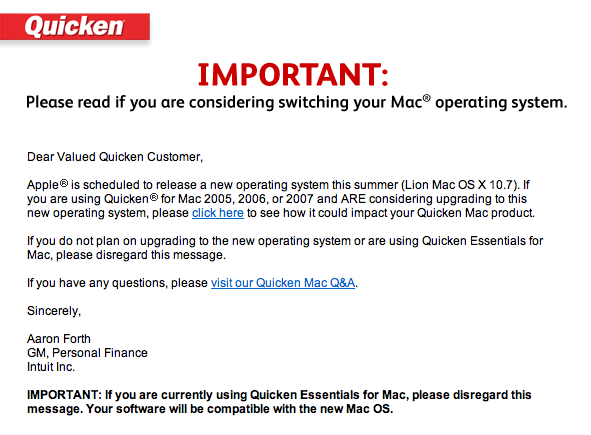
It links to this blog post on the Intuit site.  The options are not pretty:

  1. You can switch to Quicken Essentials for Mac.  It’s a great new application written from the ground up.  In their words, “this option is ideal if you do not track investment transactions and history, use online bill pay or rely on specific reports that might not be present in Quicken Essentials for Mac.” Um, sorry, who in their right mind doesn’t want to track “investment transactions”?  Turns out, at tax time, knowing the details of what you bought, at what price, and when are kind of important.  At least, the IRS thinks so.  And they can put you in jail and take everything you own.  So I’m going with them on this one.  No dice.
  2. You can switch to Mint.  I love Mint, and I’ve been using it for years.  But once again, “This option is ideal if maintaining your transaction history is not important to you.”  Yeesh.  For me, Mint is something I use in addition to Quicken.  Unfortunately, Mint is basically blind to anything it can’t integrate with online.  Which includes my 401k, for example.
  3. You can switch to Quicken for Windows.  Seriously? 1999 called and they want their advice back.  Switch to Windows?  Intuit would get a better response here if they just sent Mac users a picture of a huge middle finger.  By the way, to add insult to injury:  “You can easily convert your Quicken Mac data with the exception of Investment transaction history. You will need to either re-download your investment transactions or manually enter them.”

This is an epic disaster.  I’m not sure how many people are actually affected.  But the Trojan War involved tens of thousands of troops, so I’m going with Homer’s definition of “Epic”.

What’s the Problem?

There are really three issues at play here:

  1. Strike 1. Around 2000, Intuit made the mistake of abandoning the Mac.  Hey, they thought it was the prudent thing to do then.  After all, Apple was dying.  (The bar talk between Adobe & Intuit on this mistake must be really fun a few drinks into the evening.)  Whoops.  This led Intuit to massively under-invest in their Mac codebase, yielding a monstrosity that apparently no one in their right mind wants to touch.  From everything I hear, Quicken 2007 for the Mac might as well be written in Fortran and require punch cards to compile.  Untouchable.  Untouchable, unfortunately, means unfixable.
  2. Strike 2. Sometime in the past few years, someone decided that Quicken Essentials for the Mac didn’t need to track investment transactions properly.  I’ve spent more than a decade in software product management, so I have compassion for how hard that decision must have been.  But in the end, it was a very expensive decision, and even if it was necessary, it should have mandated a fast follow with that capability.  It’s a bizarre miss given that tracking investment transactions is a basic tax requirement.  (See note on the IRS above)
  3. Strike 3Apple announces the move from PowerPC chips to Intel chips in June 2005.  Yes, that’s *six* years ago.  Fast forward to June 2011, and Apple announces that their latest operating system, Mac OS X Lion, will not support the backwards compatibility software to allow PowerPC applications to run on Intel Macs.

Uh oh.

This is Intuit’s Fault.

With all due respect to my good friends at Intuit, this problem is really Intuit’s fault.  Intuit had six years to make this migration, and to be honest, Apple is rarely the type of company to support long transitions like this.  You are talking about the company that killed floppy drives almost immediately in favor of USB in 2000, with no warning.  They dropped support for Mac OS Classic in just a few years.  It’s not like Apple was going back to PowerPC.

If you examine the three strikes, you see that Intuit made a couple of tactical & strategic mistakes here.  But in the end, they called several plays wrong, and now they are vulnerable.

Intuit would argue that Apple could still ship Rosetta on Mac OS X Lion.  Or maybe they could license Rosetta to Intuit to bundle with Quicken 2007.

Apple’s not going to do it.  They want to simplify the operating system (brutally).  They want to push software developers to new code, new user experience, and best-in-class applications.  They do not want to create zombie applications that necessitate bug-for-bug fixes over the long term.  Microsoft did too much of this with Windows over the past two decades, and it definitely held them back at an operating system level.

A Proposed Solution: VMware to the rescue

I believe there is a possible solution.  Apple has announced that Mac OS X Lion will include a change to the terms of service to allow for virtualization.  If this is true, this reflects a fundamental shift in Apple’s attitude toward this technology.

The answer:

  • Custom “headless” install of Mac OS X 10.6.8, stripped to just support the launch of Quicken 2007.
  • Quicken 2007 R4 installed / configured to run at launch
  • Distribution as VMware image

OK, this solution isn’t perfect, but it is plausible.  Many system utilities are distributed with stripped, headless versions of Mac OS X.  In fact, Apple’s install disks for Mac OS X have been built this way.  A VMware image allows Intuit to configure & test a standard release package, and ensure it works.  They can distribute new images as necessary.

The cost of VMware Fusion for the Mac is non trivial, but actually roughly the same price as a new version of Quicken.  I’m guessing that Intuit & VMware might be able to work out a deal here, especially since Intuit would be promoting VMware to a large number of Mac users, and even subsidizing it’s adoption.

Will Apple Allow It?

This is always the $64,000 question, but theoretically, this feels like really not much of a give on Apple’s part.  They are changing the virtualization terms for Mac OS X Lion, so why not change them for Snow Leopard to0.

Can We Fix It? 

I’m a daily VMware Fusion user, which is how I use both Windows & Mac operating systems on my MacBook Pro.  If Intuit can’t work this out, I just might try to hack this solution myself.

In the end, I’m a loyal Intuit customer.  I buy TurboTax every year, and I use Quicken every week.  So I’m hoping we can all find a path here.

Feel free to comment if you have ideas.


Want Engagement? Find the Heat.

If you talk to product managers, designers, and engineers at almost any consumer internet company these days, you’ll find that they measure their success largely across three dimensions:

  • Growth (more users)
  • Revenue (more money)
  • Engagement (more visits, more activity per visit)

Believe it or not, it’s that last bullet which is the ultimate coin of the realm: engagement.  How to measure it.  How to design for it.  How to predict it.  How to generate it.

The assumption is that engagement is a proxy for the strength of the relationship with the consumer, and thus leads to both strategic advantage as well as long term monetization.

There is no one simple answer to the question of how to design and build highly engaging products and features.  Game mechanics (thanks in large part to Amy Jo Kim) has become the de facto answer for designing for engagement on the consumer internet in the past few years.  However, in the last few months, I’ve been advocating a new frame for product managers and designers to think about engagement in their products, particularly content-based applications.

Find. The. Heat.

Given the phenomenal success of Google, most modern consumer internet companies are heavily influenced by its product culture, whether they care to admit it or not.  Google made relevance the gold standard for content, and machine generated algorithms for sifting and sorting that content the scalable solution.

But when it comes to content, it’s worth considering things that frankly our colleagues in old media have known for a very long time.

There is a big difference between:

  • Content that you should read / view
  • Content that you want to read / view
  • Content that you actually read / view

It’s not an accident that there are a spectrum of news content, ranging from PBS -> 60 Minutes -> CNN -> Fox News / MSNBC.

The difference?  Heat.

For several years, I’ve been largely focused on designing products with two separate goals in mind, always in tension.  Relevance: ensuring that the content and features presented to the user are as productive as possible.  Delight: ensuring that the user experiences that mix of surprise, happiness, and comfort from using the product.  Jason Purtoti, former designer at Mint.com and current Designer in Residence @ Bessemer, has often advocated for designing for delight.

Heat, however, is not the same as delight.  But heat might be more important than delight for content-based applications.

Let me explain.  Heat covers a multitude of strong emotions.  Vice.  Virtue.  Delight.  Disgust.  Anger.  Thrill.

You can generate heat by showing people content they love… and also by showing them content that they hate.  When you get to the heart of why people share content, you realize that Youtube had virality long before social networks, feeds, and other forms of viral growth were around.  What they had was content that people wanted to share so much, they would cut and paste arcane text strings into emails and send them around.

Heat make many technologists uncomfortable.  First, it’s emotional and irrational.  Second, it’s typically at odds with strict definitions of relevance and utility.

But like the theme of this entire blog, people are predictably irrational.  TV Producers and writers tend to be experts in detecting heat from their audiences, and generating content to match it.  I believe that, just as Google revolutionized the automatic surfacing of relevant content, we can also automate the surfacing of content that generates heat.

This is fairly obvious in politics, as an example.  I can generate highly personalized and relevant content by showing liberal users articles from Daily Kos about health care.  But I can generate heat from that same audience by surfacing articles by Karl Rove on the same topic to those users.

Which are they more likely to click on?  Which are they most likely to share?

Which one generates the most heat?  Which one is “better” for them?

Please note, I am not advocating designing for heat as any form of solitary framework for building engaging products.  However, I have personally found in the past few months that this line of thinking helps inspire me to come up with far more interesting ideas for feature design.  It also seems to help teams that I work with get over mental blocks that lead to dry, boring, unemotional, data-driven content features.

Try it.

Find the heat.

Tweets: LinkedIn, Twitter & Lists

Today I had the privilege of taking the wraps of a feature enhancement that my team has been working on for the past few weeks: the new version of Tweets.

LinkedIn Blog: Find and Follow Your LinkedIn Connections on Twitter

Tweets on LinkedIn

You can install Tweets by going to the install page on LinkedIn.

There’s no need to run through all of the great new features – the LinkedIn blog post does a good job of that.   Here is some of the most notable press coverage:

The buzz was fantastic to see.  We pushed out the new application at 4PM PST, and by 4:10PM we were trending with over 20 tweets per minute about the application.  (This included a really nice shout out from Ryan Sarver at Twitter).

One of the most unique aspects of this launch was the added ability to see which of your LinkedIn connections are on Twitter, and which ones your are (or aren’t following).  For example, I personally discovered that I had over 334 LinkedIn connections with Twitter accounts, but was only following 120 of them.  With a few clicks, I was able to discover that key people, including several executives at LinkedIn, had Twitter accounts that I should be following.  Click click click.  Done.

The reason I really loved working on this project is that it captures one of the fundamental reasons the LinkedIn platform is so important.  We believe that every business application would be better if it was integrated with your professional reputation and relationships, and this feature is a great example of how Twitter can become more valuable when it’s integrated with your LinkedIn account.  Finding the right people to follow on Twitter can be difficult, and leveraging your LinkedIn network is a great way to find and follow professionally relevant Twitter accounts.

With the new Twitter list functionality, I can now keep tabs on the tweets of my LinkedIn connections on LinkedIn, on Twitter for iPhone, in Tweetdeck, Seesmic, Twitter.com or any Twitter client that supports lists.  Set it once and forget – LinkedIn keeps it up to date.

A special thank you to the team, in particular Alejandro Crosa, Sarah Alpern and Taylor Singletary.  Very exciting to see this feature live.

You’ll be even more impressed with what we have planned next.  🙂

LinkedIn for Blackberry: Get It Now

I know this is my personal blog, but sometimes launches are big enough that I feel compelled to announce them here as well.

LinkedIn Blog: LinkedIn for Blackberry: Anytime, Anywhere

You can download it at http://www.linkedin.com/blackberry

Twitter is on fire with the news right – I’m watching the stream of comments in realtime.  Great pieces on TechCrunch & Mashable already.  As usual, the team seems to find it amusing to use my profile in all the screenshots, so I guess that is some measure of fame.

The best part of this launch is that it’s just the beginning of our efforts on the Blackberry platform.  I’m very proud of the entire team for pulling together to make this first launch successful.  Special kudos to Chad Whitney on his first major launch and blog post – he even got a new profile photo for the occassion.  Chad joined my team in December 2009, and has already made a phenomenal impact on our mobile products.

The Man in the Gorilla Suit

A fun article appeared today on Silicon Alley Insider:

Silicon Alley Insider: What’s It Like Working for LinkedIn by Nicholas Carlson

It’s a short piece that covers the basics of working for a hyper-growth, late stage web 2.0 startup.  The piece begins with the following:

During a recent trip out to the Bay Area, we swung by the LinkedIn world headquarters.

We learned that LinkedIn may be the “serious” social network, but the people behind the site know how to have fun.

They wear gorilla suits to the office. They play frisbee golf around cubicles. Sometimes, they build robots modeled after each other.

Sounds like fun, right?  The article has a 24-slide series of photos to illustrate the trip.   The slide show is called:

LinkedIn is Made by Robots and Men in Gorilla Suits

It turns out that I am, in fact, the Man in the Gorilla Suit.

On Slide 17, you see a picture of the large stuffed gorilla that sits next to me at work:

I asked Kay, “what’s with the stuffed bear?” Her answer: “Get your facts right, it’s a stuffed gorilla. Sheesh.” It belongs to VP Adam Nash…

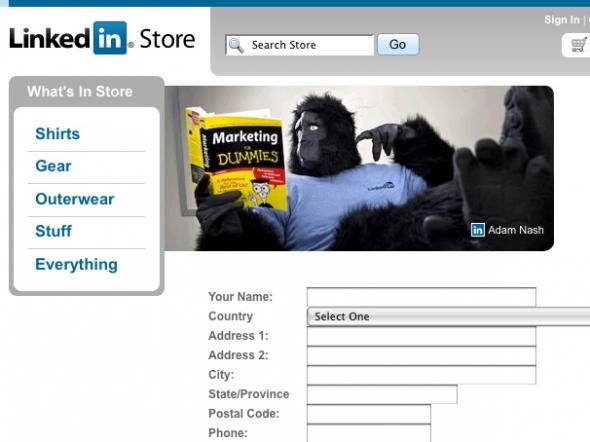
On the next slide, they provide the snapshot from the FAQ page on the company store, where I’m posing in gorilla suit, wearing a LinkedIn t-shirt:

…who is sometimes known to wear a gorilla suit around the office.

As my brother would say, “It’s funny because it’s true.”

It turns out that the Gorilla suit is just about my favorite Halloween costume.  Originally an eBay purchase in 2005, I wear it every year to the office.

So now you know.

eBay’s Value Problem is a Search Problem

It has been quite a long time since I posted here about eBay.  I still use the site regularly (I typically still list at least a few things every month), and while I may tweet about things from time to time, I rarely feel the need for a full blog post.

On January 21st, Ikai Lan (@ikai) posted this tweet:

What’s the big deal, right?  So what if Ikai found a better deal on Amazon for his Star Trek geekfest?

Here’s the big deal. This was my response to Ikai:

The issue here isn’t that I was somewhat obnoxious (although clearly, I was a bit obnoxious).  Ikai & I worked together at LinkedIn, so it’s not unexpected to have a little bit of fun with the back & forth on Twitter.

The problem is that Ikai is a smart, technical guy.  He’s also someone who looks for a good deal.  If someone like Ikai thinks that Amazon has a cheaper price on an item like the complete DVD collection for Star Trek DS9, then eBay has a real problem.

eBay’s Value Problem

When I wrote my Eulogy for eBay Express in 2008, I talked about four key value propositions that eBay navigates: value, selection, trust and convenience.  One of the motivating factors behind eBay Express was trying to find a way to leverage eBay’s huge advantages in value and selection, while shoring up perceived weaknesses in trust and convenience.

But here we are in 2010, and while eBay has the item, apples-to-apples, for over $100 less than Amazon.com – Ikai didn’t know it.  And you know what?  If a low price falls in the forest and no one is around to hear it, it doesn’t make a sound… or a sale.

eBay’s Value Problem is actually a Search Problem

The point is, despite the fact that Ikai is an engineer working at Google, he couldn’t find the item.  So a $115 price advantage was nullified.   Why?

I’m not a 100% sure what Ikai did to identify the proposed “$350 price”.  When I searched on eBay, I found literally dozens of items priced below $300, many of which were from top sellers, and many of which that offered returns.  In fact, I saw items as low as $130, but I tried to find the lowest priced item that matched the quality of service Ikai would expect from an Amazon third party seller.

Of course, I’ve been on eBay since 1998, and I spent years working on structured data and search products at eBay, so I have a hunch why I found the items and he didn’t.

He typed the wrong query. My guess is that he typed something like this “Star Trek DS9 season 1-7” in the DVD category.  Makes sense, right?  Unfortunately, this only returns two items, the cheapest of which is $299.

Despite years of investment, the eBay search engine still doesn’t understand that “DS9 = Deep Space Nine”, and that “1-7” is a range, and that “season” is an attribute that DVD sets for television series can have.

Now, what I did do?  Simple:

  1. I typed the query “deep space (nine, 9)”
  2. I selected the category for DVD
  3. I selected “Buy It Now” for listing type
  4. I sorted from highest price to lowest

Let’s review the tricks I used:

  1. The () notation is how the eBay search engine does OR.  So I was able to find listings with both “nine” and “9” in them.  To be fancy, I could have used “DS9” in there too, but it wasn’t necessary.
  2. Filter to DVD category to clean out other clutter.
  3. I figured Ikai didn’t want to bid on an auction
  4. Sorting from high to low is a counter-intuitive trick, but if you assume that the collection will be more expensive than individual DVDs, it makes sense.  I use this all the time with high priced items, since quality tends to float to the top.

I then scanned down the list to find the cheapest collection sold by a credible seller (someone with high feedback and % satisfaction).  And then I tweeted it to Ikai.

Would anyone else know how to do this? Would anyone else want to do this?

I do it, largely because I still love eBay, and because I actually know how to do it.  Plus, I really appreciate saving money on items like this, so the $115 is worth a few minutes.

But all I know is that if eBay can’t leverage it’s intrinsic price advantage with buyers like Ikai, then it has a serious problem.  They can never beat Amazon or traditional retailer e-commerce sites on trust and convenience.  They can, however, beat them on price and selection.

But customers have to be able to find those advantages to value them.

LinkedIn for iPhone 3.0 is LIVE!

Just a quick note to say that the new version of LinkedIn for iPhone is now live in the iTunes App Store.

Download LinkedIn for iPhone

I wrote a fairly lengthy piece on the official LinkedIn blog, so no need to replicate the full walk-through here.  In any case, check out this new home screen:

This application represents a huge achievement for the team.  It’s really a complete redesign and re-architecture of the entire stack supporting the application, based on an end-to-end design that was driven by user feedback and business metrics.

Building iPhone apps is a wonderful throwback in some ways to the days of client software, except with the advantage of over a decade and a half of web-based architectures.  There is a richness to client applications that the web still doesn’t replicate, and a complexity and depth to their design that is often under-appreciated.

Of course, the team had fun too.  The “Themes” feature, for example, was never part of the original plan.  It was originally a last minute easter egg that we included for fun in internal testing.  It proved so popular, however, we felt like we had to include it for everyone.

There are hundreds of things I love about this new application.  Even the way it presents a user’s profile is thoughtful, as LinkedIn is designed to allow you to put your best foot forward as a professional:

Of course, I wouldn’t be a product manager if I didn’t also have hundreds of things I’d like to see improved in the application.  It has been fun to watch the Twitter stream all day, as the feedback has been mostly positive.  Still, while this application represents a big leap forward for LinkedIn on the iPhone, it’s really just a beginning.  What’s most exciting about the architecture of this application is that it will let us rapidly innovate and improve the mobile experience through 2010 and beyond.

So here’s a quick shout out to the team – thank you for the hard work and effort in 2009 to produce an iPhone app we can be proud of.   I couldn’t be more excited for 2010, as we change the way people think of mobile business applications.

LinkedIn Takes People Search to Eleven

I apologize for the reference to Spinal Tap, but this is my personal blog after all.

I normally don’t post most LinkedIn announcements here, but this one is too big to ignore.

On Monday, LinkedIn made faceted search available to all members.  This effort brought to fruition efforts that date back to 2007 to completely rearchitect and redesign the LinkedIn search experience based on the unique characteristics of people search.

Rather than try to describe the feature here, I’ll just point to the formal LinkedIn blog post by Esteban Kozak, and embed his great youtube video on the feature:

The news coverage has been flattering:

What’s most exciting to me, however, is that these are still very early days in the development of the LinkedIn search platform.  It took LinkedIn over five years to amass its first billion queries.  This year alone, LinkedIn will exceed that number by a wide margin.  People search requires unique investments in structured data, relationship information, search intelligence, and personalized relevance.  (If you’re curious, the Boolean Black Belt got a sneak peak at some upcoming features).

I just wanted to take a moment to say kudos to the entire search team for this tremendous achievement that cuts across all areas – product, design, research, web development, engineering, marketing & operations.

Twitter integration, Open developer program, Faceted Search.  What a great way to launch into the holidays.

Can’t wait for January 🙂

LinkedIn Recommendations & The Reputation Economy

Last Friday, I had a chance to write a good, solid piece about LinkedIn Recommendations for the official LinkedIn blog.  In case you missed it, the article is here:

LinkedIn Blog: LinkedIn Recommendations & The Reputation Economy

I spent a good bit of time on this post, and even took a half hour to discuss some of the fundamental driving concepts behind it with Reid Hoffman, to help stitch together my thoughts with some of the underlying premises behind LinkedIn.  I’m pretty happy with the result.

Here’s a quick snippet:

Whether or not we realize it, we all live and work in a networked world.  Reputations matter.  Relationships matter.  Information is bombarding us from a rapidly swelling variety of sources, with increasing frequency and variability in terms of quality.  Interestingly, people are managing this incredible increase in complexity with habits and business practices that date back decades, if not centuries.

They consider the source.  They consider the context.

Fortunately, in the 21st century, with the birth of the social web, we have tools at our disposal that are orders of magnitude more powerful than we have ever had as individuals or as a society.  To quote David Weinberger from his recent talk at PDF09, Transparency is the New Objectivity:

What we used to believe because we thought the author was objective we now believe because we can see through the author’s writings to the sources and values that brought her to that position. Transparency gives the reader information by which she can undo some of the unintended effects of the ever-present biases. Transparency brings us to reliability the way objectivity used to.

This change is, well, epochal.

David is talking about journalism, but his insights are at the heart of why LinkedIn is such a powerful concept.  On LinkedIn, the skills that you’ve spent your career obtaining, the experience that you’ve earned, the trusted relationships that you’ve formed – they are all made largely transparent.  Your professional reputation and relationships matter – and not just to you.  That value extends far beyond your profile itself – it carries over to every interaction, every message, and every piece of contributed content.

It’s always rewarding when you write a post like this to get positive feedback.  Here is a flattering quote from Neal Schaffer:

I think the most brilliant blog post to come out of reaction to Jeremiah’s is the one on the official LinkedIn Blog entitled “Recommendations and the Reputation Economy” and written by LinkedIn’s own Product Director Adam Nash.  He went further to talk about how transparency is the new objectivity and that not only are recommendations often mutual, but that requesting recommendations is absolutely normal.  In fact, he ends his post asking you to write three recommendations for people unsolicited.  Exactly!  That line could have been taken out of my upcoming book!

Normally I don’t flag every post I make to the corporate blog here on my personal site, but if you’re interested, do check out the piece.

Embrace the Minimum Necessary Change (MNC)

In keeping with my theme this week of blogging observations, this one ties together a basic tenet that I learned from science fiction in my pre-teen years, and applies it to product management.

The concept is borrowed from “The End of Eternity“, one of the classic science fiction novels from Isaac Asimov.  The book imagines a future with time travel, and the guidelines that govern its use:

There is a group of people (only males) who are called The Eternals. They live outside of ordinary time and space in a man-made construct called Eternity. The Eternals can move back and forth between Eternity and Earth, entering into any time period of Earth’s history. Their mission is to make Reality Changes, changes in the course of human history that will result in an improved Reality. They try to do this with the help of computers that can predict how even subtle changes will alter Reality. There is an art to finding the minimal intervention that will result in a desired Reality Change. There is a special change called “The Minimum Necessary Change“.

I’ve been surprised over the years how often I find myself using this concept, the “minimum necessary change”, to help frame potential solutions to problems.

In some ways, it’s a fairly obvious outcome of a scientific education.  Occam’s razor demands that, all things being equal, we bias towards the simplest explanation.  It’s not a far stretch to morph that concept into a bias towards the simplest solution to a given problem.

Seasoned product managers are also familiar with another, related concept, the “minimally viable product”.  The MVP, of course, is the minimal number of features necessary for a product to be successful at achieving it’s business & product goals.

Today, at LinkedIn, I was in a fairly intense meeting discussing potential solutions for a product that we’re trying to roll out in the next few weeks.  A fairly significant issue has arisen, and the team has been debating solutions.

It’s very easy for product managers and engineers to sometimes get caught up in “redesign fever”.  An unexpected issue or constraint arises that wasn’t expected.  Immediately, smart people will retrace their steps back to the beginning, and imagine a radical new design for their product that incorporates that new issue.  The problem is, there are always new issues.  There are always unexpected constraints.  Redesign fever can and will prevent products from converging, and prevent teams from shipping.

I’ve found that the best way to resolve these types of issues is to clearly define the problem, brainstorm potential solutions, and then way the pros/cons of each.  Not rocket science.

However, make sure as part of the exercise that the “Minimum Necessary Change” is one of the solutions that is part of the decision set.  It helps frame the costs (and benefits) of more elaborate solutions.  In fact, the intellectual pleasure of finding a simple, elegant solution to a complex problem can turn into a highlight for the entire project.

If you believe in fast iteration, in shipping product quickly and frequently to incorporate real user feedback into your designs, then more often than not you’ll find that the Minimum Necessary Change is your friend.

Guide to Product Planning: Three Feature Buckets

In the spirit of capturing some of the observations that I find myself repeating, I’m adding this one to the mix tonight.  Unlike the previous two, this is really a piece of concrete advice for product managers of consumer software or consumer internet products.  It’s also a more recent observation that I’ve formulated in the past few years.

This advice takes the form of a simple classification framework for the features that you are considering for a product, whether it’s a single “large scale” launch, or a series of product features that are planned out on a roadmap.

Place your feature concepts in one of three buckets:

  • Metrics Movers. These are features that will move your target business & product metrics significantly.  In most healthy product organizations, there are specific goals and strategies behind the decision to invest in a product or feature.  Engagement.  Growth.  Revenue.  Typically, very few features are actually metrics movers.  Know which ones they are ahead of time, because in the end, the judgment of whether your product or roadmap succeeded or failed will rest on the evaluation of the metrics.
  • Customer Requests. These are features that your customers are actively requesting.  There is no mystery here.  Listen to your customers, and know which features they want to see the most.  You don’t necessarily want to implement every suggestion, but product professionals need to listen to direct requests carefully, with humility and deep consideration.  Nothing irritates customer more that to see you roll out new features that exclude the ones that they have already identified and requested actively.
  • Customer Delight. These are features that customers haven’t necessarily asked for, but literally delight them when they see them.  Typically these are features that require several ingredients: listening to customers to understand their pain points, leveraging a knowledge of technology to know what might be possible, and innovative design to come up with an unexpectedly elegant & delightful experience.

Don’t get me wrong – there are some features that can fall in more than one bucket, but it’s a rare feature that actually falls in all three.

I’ve found that categorizing features into these buckets forces product teams to be intellectually honest with why they are implementing a certain feature.  Is it because customers want it?  Or is it because the company wants it (to move metrics)?  Or is it just cool?

For large, monolithic releases of features, optimal success comes from packaging up items from each of these buckets.  The customer requests ensure that your customers see that the time that they are investing in your products is rewarded by a provider who listens and delivers.  Your metrics movers ensure that the business and strategy you are executing on will provide the resources to invest in future iterations.  And your customer delight features highlight your ability to leverage expertise in technology & design to deliver innovative capabilities.

Conversely, if you find yourself without one of these buckets represented, it likely represents a serious hole in either your channels for customer feedback, your product execution, or your innovation capabilities.  These holes will significantly impact both your short term and long term success in this area.

Most consumer internet companies don’t ship monolithic feature redesigns often – instead they release small iterations and additions frequently.  (At LinkedIn, we release every week.)  The logic above, however, can just as easily apply to a series of 1-2 week features executed over the course of a three month roadmap as a large monolithic release.

Take a moment and consider major product releases in the consumer space that you really respect as a product professional.  I think you’ll find that these releases have all three of these buckets well represented.  (iPhone 3.0 is not a bad recent example.)

PDMA 2008: Building a World Class Web 2.0 Product Organization

Last year, I had the opportunity to speak at the PDMA International 2008 conference in Orlando, FL.  I gave a talk entitled:

“Building a World Class Web 2.0 Product Organization”

While I posted this presentation to Slideshare and on my LinkedIn profile, it turns out I never actually posted it here on this blog.

Christina Wodtke, author of Elegant Hack and a Principal at LinkedIn, gave a talk this week on Product Management and borrowed a few of my slides.  As a result of that talk, I saw this blog post, about the definition of a product manager, come through my Google Alerts today.

pdma_adam_nash_product_manager

For those of you who’ve worked with me, it’s a classic “Adam Nash slide“.  The tell-tale sign is the use of simple geometric shapes, typically in pastel colors.  (I’m not proud of my limited PowerPoint skills.  In fact, you could say I’m proud that I don’t have advanced PowerPoint skills.)

Anyway, I’m glad to see that the content was useful/interesting for both Christina and her audience.  It was also a great reminder to post the deck here too for anyone who is interested.

BTW The second edition of Christina’s book on information architecture is now available on Amazon.  You might want to check it out.

LinkedIn Hacks: Advanced Search Operators

I can’t help myself really.  What’s the point of putting advanced search operators in the new LinkedIn Search platform if no one knows about them?

So I have a new blog post up on the LinkedIn corporate blog:

LinkedIn Blog: Advanced Search Operators for the LinkedIn Pro

If you are curious, but not curious enough to click through, advanced search operators let you specify any query that you can configure with LinkedIn’s advanced search graphical user interface through just command-line tags.

Example:

If you want to find who in your network went to Stanford and currently works at Google, you can type:

school:Stanford AND ccompany:Google

This search will look for the keyword “Stanford” only in the school field of the LinkedIn profile, and look for “Google” only in the current company field.  Much more exact that looking for every profile that has “Stanford” and “Google” in it.

Thanks to the new search platform, millions of users are discovering the power of people search for the first time.  But there are also millions of power users who already use LinkedIn search to get their jobs done, and the team felt that giving them command-line-like power over the search experience would be appreciated by power users.

So enjoy.  Bringing power features like this to the LinkedIn platform is one of the joys of being on the team.

Google Superstar Joins LinkedIn

Can’t get much better press than that, right?  The title is copied verbatim from a blog post on the announcement.

From Finance Geek:

A Google (GOOG) rock star defects: Dipchand “Deep” Nishar, who helped kickstart Google’s mobile business, is moving to LinkedIn.

WSJ: Mr. Nishar, 40, in January will become vice president of product strategy for the social-network that is focused on professionals. He will lead LinkedIn’s efforts to develop new products and services on top of its social-networking site. LinkedIn chairman Reid Hoffman, who had previously filled the senior product role, will remain at the company and shift his focus on broader strategy issues…

Mr. Nishar held a range of jobs at Google, including building the back-end infrastructure for Google’s monetization systems, starting its mobile initiatives and, more recently, overseeing product development for the Asia-Pacific region. He worked closely with Jonathan Rosenberg, Google’s senior vice president of product management, and was the recipient of a rare and lucrative accolade given to employees who have made extraordinary contributions to the company, known as the Google Founders Award.

The original Wall Street Journal article is here.  My favorite quote from Deep:

His departure comes as the recession has made a move from a mature company to a start-up more risky. But LinkedIn, which has 32 million registered users, is better positioned than many… “I don’t view LinkedIn as risky by any means,” said Mr. Nishar.

Very excited to have Deep join the team in 2009.  His LinkedIn profile is here for more detail on his professional achievements.

The Right Way to Implement Change

One of the great joys in Product Management is the launch of great new features and platforms that touch millions of users.  Recently, I’ve had the pleasure of watching my team launch one of the biggest and most challenging efforts at LinkedIn to date with the launch of the new LinkedIn Search.

If you haven’t tried it, you should.  It’s fantastic.

Even more exciting to me, of course, is the fact that this new search engine, as great as the features are, is just scratching the surface of what we’ll be able to achieve in 2009 and beyond.  It’s no surprise to me that Search has driven a number of major innovations on the web in the past decade.  Over the years, the baton of technology leadership and innovation has been passed from natural search to paid search to product search, and I firmly believe that technology and customer demand points to people search as an area with the breadth and depth for incredible innovation in the next few years.

Search is a huge piece of the LinkedIn experience for millions of users for obvious reasons – so many of our professional tasks require us to “find the right person” based on expertise, based on geography, based on company, and most of all, based on relationship.  That’s the kicker.  People search, by its nature, must be socially relevant to the searcher.  Completely.  The same query can and should be ordered differently based on your unique profile and relationships, because that’s what matters in this context.

One of the hardest problems in Product Management, however, is how to upgrade and change a product that millions of people are using every day to get their jobs done.  It isn’t easy with consumer software, it isn’t easy with enterprise software, and it’s almost impossible in the 24×7 world of the consumer internet.  Even small incremental changes can be incredibly difficult, so where does that leave you when you have to make large, whole-scale change?

All the Web 1.0 companies have struggled with this, and I don’t think there is a single right answer to this question because every community and product is different to some extent.  But fundamentally, there are approaches that can help produce the best possible outcomes in these tough situations, and they all begin and end with how you communicate, interact and respond to your customers.

That’s why I had to share here this blog post I found tonight about the recent Search launch.

WebProNews: LinkedIn Looks to the Community For Improvement.  The Right Way to Implement Change.

While I am excited about the new search product features, and I am excited about the new technology and platform we’ve built, I’m even more excited in this case about how the team researched, built, tested, and launched this product.

I’m excited that Sarah, our Principal Designer on the new Search, wrote this blog post about the importance of the customer in our thinking and process.  I’m excited that Chris at WebProNews (among other blog posts I’ve seen) noticed that we cared.

It’s a truism on the consumer internet that if you’ve ironed out all the risks and uncertainty in product improvement, you are moving far too slow and with too little tangible feedback from your customers.  Usability testing, competitive research, site metrics, customer service, quality requirements, innovative engineering, and communication will not, by themselves, guarantee success every time.  They can’t because the inherent complexity and pace of change is too great (thankfully) on the consumer internet.

But I believe that, over time, these techniques properly utilized increase your odds of success, where success is defined by the utility and delight that you provide your customers.

I’ve had a number of proud moments at LinkedIn, but I just wanted to say here how proud I am of the user experience team at LinkedIn, and how proud I am of the teams that helped make the new search a reality.

I’m proud of what you’ve built, and more importantly, I’m proud of how you did it.

The Right Way to Implement Change.