Get LinkedIn on Your iPhone, Now!

It’s live, it’s live!  After weeks in beta, it’s LIVE!

This is just the first release, but already you can:

  • Search LinkedIn from your iPhone
  • View all your contacts and their full profiles, from your iPhone
  • Invite new people you meet, from your iPhone
  • Browse your network updates, from your iPhone

What are you waiting for?  You should immediately:

  1. Use your iPhone to go to: http://iphone.linkedin.com
  2. Hit the (+) button in the middle bottom control bar on your iPhone Safari.  This adds LinkedIn to be one your your default web clippings on your iPhone desktop.  An absolutely gorgeous “IN” logo will grace your iPhone.

For those of you who don’t have an iPhone, this is actually the same URL that serves http://m.linkedin.com, our general mobile application URL.  Of course, if you don’t have an iPhone yet, you might want to just add that step above (1) above.

I installed the beta of this application on my wife’s iPhone, and I play with it incessently when we’re on the road.  It’s completely addictive.

Brought to you, with love, from a major web company that develops it’s site exclusively on Mac OS X.
The LinkedIn Wizard is Out!

It’s Thursday night, and in Mountain View right now, great new features and enhancements are rolling out, as usual, to the LinkedIn website.

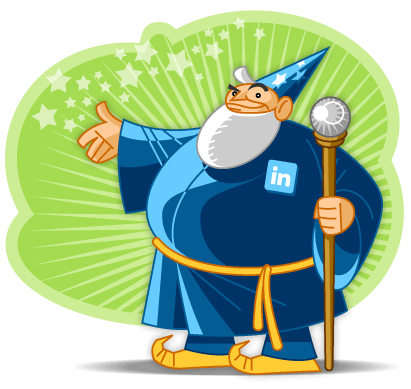
There is much lore about the origins and purpose of the LinkedIn wizard, but you only see him on Thursday nights, when we’re doing a release that requires downtime.

Right now, I’m in Boston, so I’m missing the release and the dinner and the Rock Band sessions that go with it.  But fortunately, the Wizard is there, to help me feel a little closer to home.

LinkedIn As A Source of Record…

Very interesting article Friday on the former Miasolé CEO:

Short synopsis, from the article:

Dave Pearce, former CEO of Miasolé, has apparently joined a new company called Nuvosun, according to CNET.The company is trying to develop a film that will prevent moisture from penetrating — and degrading — thin-film solar panels, the story says.

OK, so that part may not be that interesting to you, unless you’ve been following the solar tech industry closely.  (Miasolé, pronounced MEE-AH-SO-LAY, is venture backed by Kleiner Perkins).  But check out this paragraph:

CNET said it contacted Pearce, but hadn’t heard back to confirm the details and cited a LinkedIn profile. Greentech Media also has been unable to contact Peace or to get others to confirm his new role.

However, one former employee confirmed that former Miasolé’s Pearce did have a LinkedIn profile, and the only LinkedIn profile for “Dave Pearce” that cites previous experience at Miasolé and Domain Technology — a thin-film hard-drive manufacturer where Pearce was previously CEO — lists him as president and CEO of Nuvosun.

I checked the original CNET article:

CNET News.com contacted Pearce, but have not heard back to confirm these details. However, we know for certain that Nuvosun is the name of the company. He’s listed as the CEO of Nuvosun on his LinkedIn profile.

That’s right – the information source that broke the news was a LinkedIn profile.

Now, I’ve seen this happen with friends and colleagues before – someone gets a promotion, a new job, or leaves a company.  They then update their LinkedIn profile long before the news has become public… and the LinkedIn Network Updates feed breaks the story for them.  (Note to audience – LinkedIn has a preference where you can turn off updates, which can be useful at times when you don’t want the story to break this way).

Still, this is the first time I can recall seeing a press story where the source of record that confirmed the story was LinkedIn.  In fact, it’s even the byline of the article:

A LinkedIn profile for Dave Pearce, former head of the Santa Clara, Calif., thin-film firm, lists him as CEO of NuvoSun.

Pretty cool, when you think about it.  I think this is going to become more and more common as LinkedIn becomes the preferred source of record for professional reputation, experience and education.

New LinkedIn Feature: Viewers Of This Profile Also Viewed

So, in case you are wondering, this feature was kind of tricky to name. 🙂

Steve Stegman has a post on the LinkedIn blog today announcing a new feature we’re testing, currently dubbed “Viewers of this profile also viewed…”

Steve does a good job explaining the feature. It’s located on the profile page, on the right side. (You have to be signed in, and if you are looking at your own profile, you have to click the link that says “View My Profile as others see it…”) In a nutshell, for this module LinkedIn is showing, in the aggregate, the other profiles that people are most likely to visit if they visited your profile. It sounds simple, but actually there is some significant complexity in cleaning out the data to get a good set of interesting profiles to browse.

I’ve clicked through over a dozen people in the past couple of days, and I continue to be surprised at how well it works. My results are excellent, but given my relatively public role at LinkedIn, I assumed my profile gets enough views to generate good aggregate results.

(In case you are curious, here are the 5 profiles you are most likely to visit if you visited mine, as of today)

Let’s see – Dan is our CEO, Jamie & Allen & I report to Reid, and Elliot is on my team. Definitely not hard to see the connections here. 🙂

As an example of a typical user, let’s look at my mother’s profile:

The first three are pretty obvious, but for some reason, Jonathan isn’t as popular as Elliot or Elizabeth?  Hmmm.  🙂

If I click through to Daniel’s profile, I see the following:

Now that’s 5 for 5!  Brother, sister, mother, brother, wife.

I’m finding that following just this module, I can browse LinkedIn in a really fun, new way.  Some of the results are pretty surprising.  It adds just a bit of serendipity (dare I say it?) into browsing people.

A couple of weeks ago, I wrote a quick post about the “People You May Know” feature on LinkedIn. This new module is yet another interesting way to look at the ways people are related – this time informed by the millions of clicks that hit LinkedIn every day.

Kudos to Steve and the analytics team for this new, interesting view.

My Mail.app Plugin, v0.1

Major milestone tonight.

Spent two hours after the boys went to bed.  Managed to get swizzling working.  I have now completed a Mail plug-in that when installed…

… drumroll, please …

logs out to console the name & email address of the sender of every email you view in Mail.app.

… let it sink in …

OK, it may not sound significant, but that was 1 of the 7 things I have to get working to have a demo of my new Mail plug-in up and running.  I now have a renewed burst of confidence that this plug-in will indeed get done.
Many thanks to Adam Tow, who responded to my previous blog post, sharing not only tips & sample code, but also a pointer to a regular, weekly coffee night for Cocoa developers in Campbell.  I had forgotten how supportive the Mac development community was… this event looks pretty neat.  Maybe when I get to the really tough stuff, I’ll go.

Mac OS X: Method Swizzling in Cocoa

It took me about 45 minutes, but I finally think I have this figured out:

Method Swizzling in Cocoa

Basically, it’s the missing piece you need to effectively “hijack” an existing function in an existing piece of Mac OS X software.

To do this, you follow a few key steps:

  1. You identify a method of an existing class in an existing piece of software that you want to hijack, let’s call it “foo”
  2. You then write your own implementation of that method in that class, let’s call it “myFoo”
  3. You do what ever you want in myFoo, but then you include a call to myFoo. It looks like infinite recursion, but it’s not.
  4. You do the MethodSwizzle trick, which basically tells the Objective-C runtime to replace all calls to “foo” with “myFoo”, and vice-versa.

End result, every existing call to “foo” now calls “myFoo”, and “myFoo” is no longer infinitely recursive because it’s call to “myFoo” now calls “foo”.

It turns out this type of trickery is essential if you want to write a plug-in for an existing application, like Apple Mail, where there is no pre-defined API, and you want to take over pre-existing actions and add some functionality to them.

My work on an Apple Mail plug-in is painfully slow, but I’m at least a little further along now.

People You May Know on LinkedIn

Very funny post today on Everyday Goddess:

Seriously, LinkedIn has this has this function where it says, Hey, you might know these people! And I almost always do.

Yeah, they’re friends of friends, but out of all the friends that a friend of mine has, how does LinkedIn pick my ex-boyfriends, some guy I dated, a graphic artist I met at a gallery opening, and the one colleague from a huge past company that I actually do know? Seriously, they’ve got some kickin’ smart technology going on over there.

The truth is, of all the questions I get about LinkedIn, this is one of the most consistent ones. People are just fascinated by People You May Know (that’s the name we gave to that particular application).

One of the things I love most about working for LinkedIn is that the primary problem is all about people – their professional reputations, their relationships, and the activities based on them. We are in such early stages of understanding and capability.

In any case, I thought the last line was funny.

Seriously, they’ve got some kickin’ smart technology going on over there.

Definitely something that every engineer wants to hear. 🙂

And no, I’m not telling you how it works.

Update (10/24/2008): Hi everyone.  This post continues to traffic from time to time, and sometimes fairly hostile comments.  As a result, I’m closing down the comment thread here, since this was meant to just be a fun observation of a user response, and not an in-depth analysis of the feature or social network functionality in general.   This is my personal blog, and I’d rather keep it that way, so please direct any additional comments about the feature itself to the main corporate blog.   Thanks.

Planes, Trains & Automobiles: MBA Version

I forgot to mention it here, but last night I began a multi-day tour of a few business school events out on the East Coast.

I began by flying out on JetBlue on the red eye to be on a panel on Social Networking at the HBS Cyberposium 2007 event in Cambridge, MA. Despite only one hour sleep on the plane, and a cat-nap this morning, the event went off without a hitch. Lots of great questions from the audience, and it’s always a pleasure to explain to people the focus & vision behind LinkedIn. I was a bit surprised at the turn out – the panel before ours on IPOs seemed to only fill about 1/4 of the seats in the large auditorium. Our panel, however, packed the room to the point of people standing in the back. Great showing.

Here is the detail on the panel (from the CyberPosium 13 website):

Want to join my “Friend-Spaced-In” network? What good is social networking?

Friendster has come, and for the most part, gone. MySpace has evolved from being the hottest site for teenagers to becoming part of Rupert Murdoch´s global empire. New social networking sites focused on specific verticals pop up by the minute. Why is social networking important? What are its benefits? Additionally, social networking is catching fire all over the world. Are there any transferable lessons for global social networking entrepreneurs that will help them avoid irrelevance?

This is a quick snapshot of Spangler, which has the auditorium where I spoke today. This was the new, fancy student building on the HBS campus in 2001 when it opened.

This really surprised me – I’m not sure if it was a Turkey or a Turkey Vulture, but it was just sitting outside Spangler on a bench. I thought it was fake at first until I saw it move around.

Tomorrow is a travel day – I hop a train to Philadelphia for events at Villanova & Wharton on Monday & Tuesday. I’m so glad I don’t have to fight through the airport for that leg of the trip.

So in case you are wondering where I am, now you know. 🙂

Campfire One Video is Live (Open Social Launch)

The video from Campfire One, the launch event for Open Social last night at the Google campus is now live.

The demo that Elliot & I give for LinkedIn is about 38:30 into the video (or 18:55 from the end, if you have the timer set up to run backwards). It’s a good thing there was a rehearsal – I’m pretty sure my demos are always better the second time. 🙂

The event was fun to do – it was really a campfire set up in the middle of Google campus. Yes, there were real fires. In fact, the smoke was a real hazard to the speakers – if the wind went the wrong way, all of sudden you’d be blinded and unable to speak. I think Marc Andreessen got the worst of it in rehearsal.

The Google site for the OpenSocial APIs is live now. The LinkedIn blog post on the topic is here.

My previous blog post on Open Social is here.

LinkedIn & Open Social. Two Great Tastes That Taste Great Together.

I think you can tell from the title why the marketing team at LinkedIn keeps a close eye on me. 🙂

This week has been extremely busy… a lot of press attention already to the LinkedIn partnership with Google on the new Open Social APIs.

Since this is my personal blog, I thought I’d just flag a few articles and posts around the web in case you are interested. The big demo is tomorrow night, and it looks like I will actually get a chance to take the stage with Elliot Shmukler to give it. Let’s hope the demo gods are kind.

It’s really wonderful to be able to talk to our community about Open Social, and about the LinkedIn platform. There are absolutely amazing people at LinkedIn working on making all of this possible, and it’s a joy to get out there and help people understand and appreciate their great work.

So, before the big event, here are a few interesting posts:

More to come on this topic, I’m sure.

The LinkedIn Store is LIVE!

Tonight, the new LinkedIn online store went live.

https://store.linkedin.com

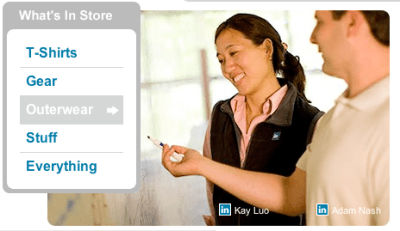
One of the best parts of working at a startup is that you get to participate in all sorts of company activities.  In this case, all of the “models” in the store are actual LinkedIn employees.

For example, you may recognize the guy talking here on the LinkedIn fleece vest page:

If you hover over the “Adam Nash” link on the real website, it says “Props to our Product team”.  🙂

I guess with the new store, our CEO may have to modify his explanation of our business.  Technically now we have four revenue streams.

Order your LinkedIn merchandise today!

eBay Launches Social Networking… or at least, Neighborhoods

eBay launched Neighborhoods today, part of their big push to re-invigorate activity and excitement around the core of the auction platform.  eBay was built over people connecting about the products and categories that they collect and sell, and this effort definitely attempts to recapture more of that original community feel.

What are Neighborhoods?
Think of Neighborhoods as a gathering place for fans of a certain product, team, artist, and more. They’ve been created around popular items and searches and are designed for members with a very specific interest in mind.

For example, if you’re crazy about Audi automobiles, steer yourself over to that Neighborhood. Or maybe you love the “Slippery When Wet” album…the Bon Jovi Neighborhood could be for you. You’ll be able to find links to Neighborhoods on applicable search results pages and the Community hub, or simply search for them at http://neighborhoods.ebay.com.

Within a Neighborhood, you’ll find a discussion board dedicated to that topic where you can ask and answer questions, brag about your latest auction win, or discuss what’s new. You can upload and share photos related to that topic – and vote on which are best – or check out related listings, reviews, guides and blogs. You can even use our tools to see who else is part of that Neighborhood, or to find other Neighborhoods that might interest you.

Auctionbytes covered the launch basics on their site as well.

You can find eBay Neighborhoods here.  I joined this neighborhood dedicated to the Apple iPhone here.  Performance is incredibly slow right now, but I’m assuming they are working out the kinks there.

I caught some flack a few weeks ago for a post I wrote on Ning, where I basically argued that eBay should have acquired Ning before it received financing at a $200M+ price tag.  At the time, I compared it to eBay Groups, which was the 2004 effort by eBay to upgrade their community functionality.  Clearly, eBay Neighborhoods is a much fairer comparison.

Discuss.